fallback은 shell에 포함되고 동적 콘텐츠는 요청 시점에 스트리밍됩니다.
예상 체감 완료: ~360ms (개념 이해용 추정값, 실제 환경에 따라 다름)
Good to know: Cache Components is an opt-in feature. Enable it by setting the
cacheComponentsflag totruein your Next config file. See Enabling Cache Components for more details.
Cache Components lets you mix static, cached, and dynamic content in a single route, giving you the speed of static sites with the flexibility of dynamic rendering.
Server-rendered applications typically force a choice between static pages (fast but stale) and dynamic pages (fresh but slow). Moving this work to the client trades server load for larger bundles and slower initial rendering.
Cache Components eliminates these tradeoffs by prerendering routes into a static HTML shell that's immediately sent to the browser, with dynamic content updating the UI as it becomes ready.
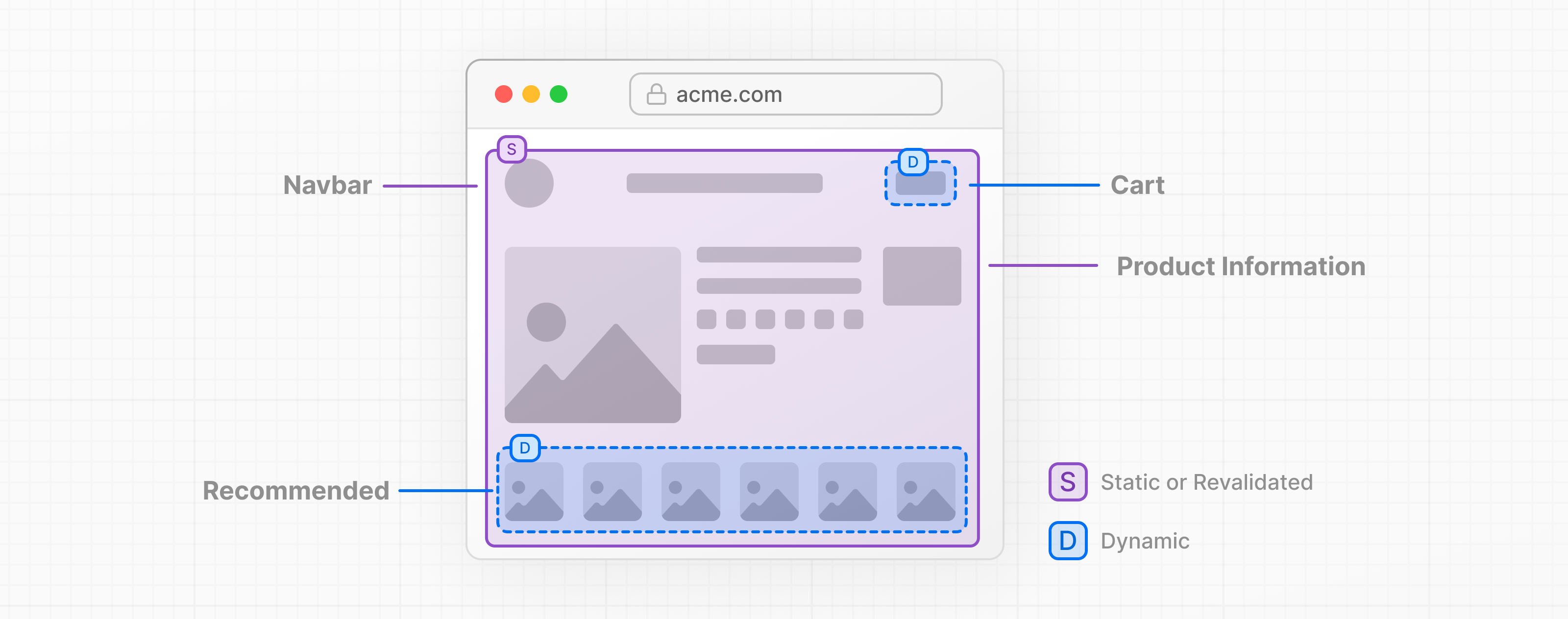
At build time, Next.js renders your route's component tree. As long as components don't access network resources, certain system APIs, or require an incoming request to render, their output is automatically added to the static shell. Otherwise, you must choose how to handle them:
<Suspense>, showing fallback UI until the content is readyuse cache directive to include it in the static shell (if no request data is needed)Because this happens ahead of time, before a request arrives, we refer to it as prerendering. This generates a static shell consisting of HTML for initial page loads and a serialized RSC Payload for client-side navigation, ensuring the browser receives fully rendered content instantly whether users navigate directly to the URL or transition from another page.
Next.js requires you to explicitly handle components that can't complete during prerendering. If they aren't wrapped in <Suspense> or marked with use cache, you'll see an Uncached data was accessed outside of <Suspense> error during development and build time.
Good to know: Caching can be applied at the component or function level, while fallback UI can be defined around any subtree, which means you can compose static, cached, and dynamic content within a single route.
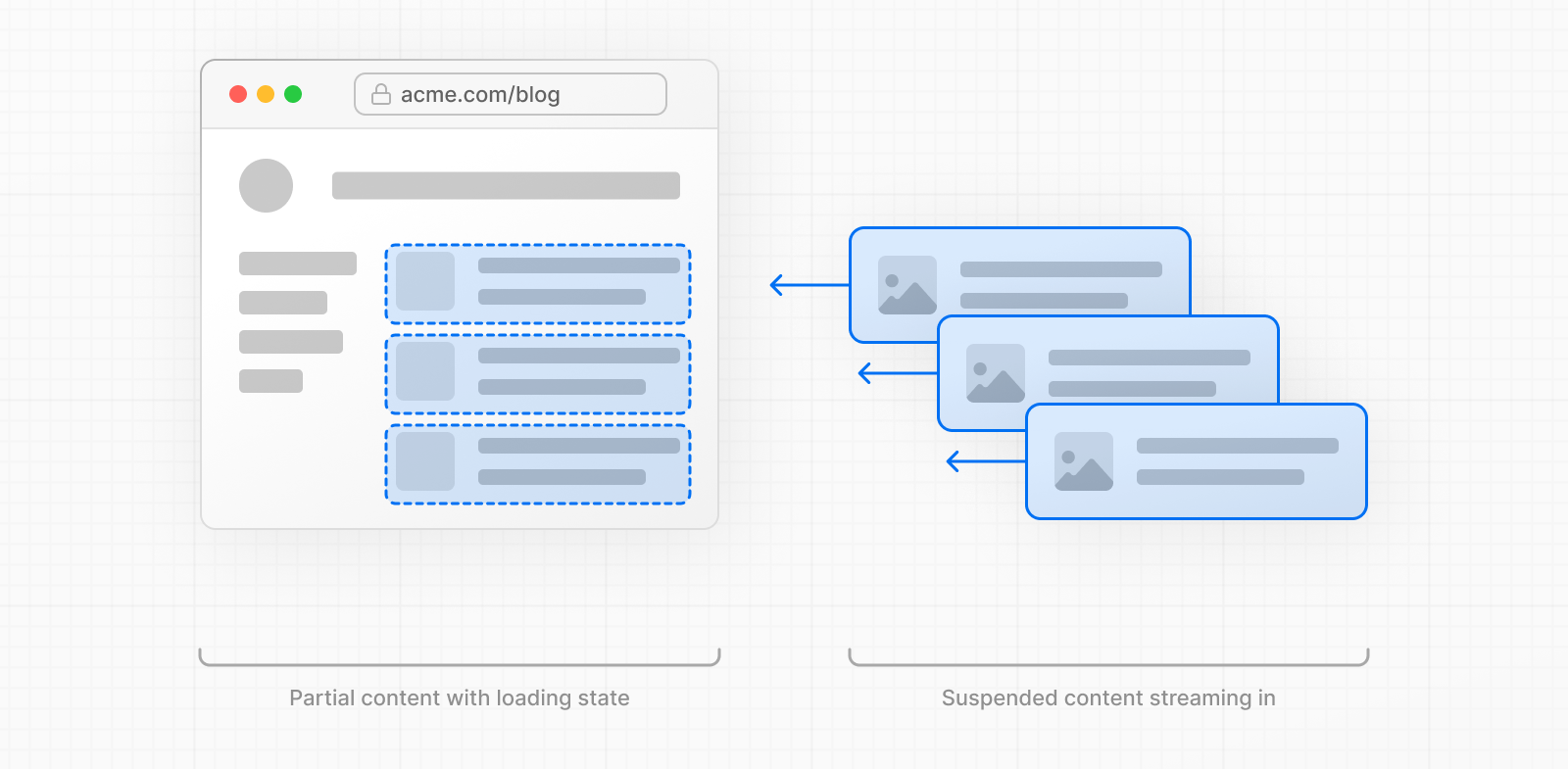
This rendering approach is called Partial Prerendering, and it's the default behavior with Cache Components. For the rest of this document, we simply refer to it as "prerendering" which can produce a partial or complete output.
🎥 Watch: Why Partial Prerendering and how it works → YouTube (10 minutes).
Operations like synchronous I/O, module imports, and pure computations can complete during prerendering. Components using only these operations have their rendered output included in the static HTML shell.
Because all operations in the Page component below complete during rendering, its rendered output is automatically included in the static shell. When both the layout and page prerender successfully, the entire route is the static shell.
import fs from 'node:fs';

export default async function Page() {
  // Synchronous file system read
  const content = fs.readFileSync('./config.json', 'utf-8');

  // Module imports
  const constants = await import('./constants.json');

  // Pure computations
  const processed = JSON.parse(content).items.map((item) => item.value * 2);

  return (
    <div>
      <h1>{constants.appName}</h1>
      <ul>
        {processed.map((value, i) => (
          <li key={i}>{value}</li>
        ))}
      </ul>
    </div>
  );
}
Good to know: You can verify that a route was fully prerendered by checking the build output summary. Alternatively, see what content was added to the static shell of any page by viewing the page source in your browser.
During prerendering, when Next.js encounters work it can't complete (like network requests, accessing request data, or async operations), it requires you to explicitly handle it. To defer rendering to request time, a parent component must provide fallback UI using a Suspense boundary. The fallback becomes part of the static shell while the actual content resolves at request time.
Place Suspense boundaries as close as possible to the components that need them. This maximizes the amount of content in the static shell, since everything outside the boundary can still prerender normally.
Good to know: With Suspense boundaries, multiple dynamic sections can render in parallel rather than blocking each other, reducing total load time.
External systems provide content asynchronously, which often takes an unpredictable time to resolve and may even fail. This is why prerendering doesn't execute them automatically.
In general, when you need the latest data from the source on each request (like real-time feeds or personalized content), defer rendering by providing fallback UI with a Suspense boundary.
For example, the DynamicContent component below uses multiple operations that are not automatically prerendered.
import { Suspense } from 'react';
import fs from 'node:fs/promises';

async function DynamicContent() {
  // Network request
  const data = await fetch('https://api.example.com/data');

  // Database query
  const users = await db.query('SELECT * FROM users');

  // Async file system operation
  const file = await fs.readFile('..', 'utf-8');

  // Simulating external system delay
  await new Promise((resolve) => setTimeout(resolve, 100));

  return <div>Not in the static shell</div>;
}
To use DynamicContent within a page, wrap it in <Suspense> to define fallback UI:
export default async function Page(props) {
  return (
    <>
      <h1>Part of the static shell</h1>
      {/* <p>Loading..</p> is part of the static shell */}
      <Suspense fallback={<p>Loading..</p>}>
        <DynamicContent />
        <div>Sibling excluded from static shell</div>
      </Suspense>
    </>
  );
}
Prerendering stops at the fetch request. The request itself is not started, and any code after it is not executed.
The fallback (<p>Loading...</p>) is included in the static shell, while the component's content streams at request time.
In this example, since all operations (network request, database query, file read, and timeout) run sequentially within the same component, the content won't appear until they all complete.
Good to know: For dynamic content that doesn't change frequently, you can use
use cacheto include the dynamic data in the static shell instead of streaming it. See the during prerendering section for an example.
A specific type of dynamic data that requires request context, only available when a user makes a request.
cookies() - User's cookie dataheaders() - Request headerssearchParams - URL query parametersparams - Dynamic route parameters (unless at least one sample is provided via generateStaticParams). See Dynamic Routes with Cache Components for detailed patterns.import { cookies, headers } from 'next/headers';
import { Suspense } from 'react';
async function RuntimeData({ searchParams }) {
// Accessing request data
const cookieStore = await cookies();
const headerStore = await headers();
const search = await searchParams;
return <div>Not in the static shell</div>;
}
To use the RuntimeData component, wrap it in a <Suspense> boundary:
export default async function Page(props) {
  return (
    <>
      <h1>Part of the static shell</h1>
      {/* <p>Loading..</p> is part of the static shell */}
      <Suspense fallback={<p>Loading..</p>}>
        <RuntimeData searchParams={props.searchParams} />
        <div>Sibling excluded from static shell</div>
      </Suspense>
    </>
  );
}
Use connection() if you need to defer to request time without accessing any of the runtime APIs above.
Good to know: Runtime data cannot be cached with
use cachebecause it requires request context. Components that access runtime APIs must always be wrapped in<Suspense>. However, you can extract values from runtime data and pass them as arguments to cached functions. See the with runtime data section for an example.
One approach for reading runtime data like cookies without blocking the static shell is to pass a promise to a client context provider. See Sharing data with context and React.cache for an example.
Good to know:
React.cacheoperates in an isolated scope insideuse cacheboundaries. See React.cache isolation for more information.
Operations like Math.random(), Date.now(), or crypto.randomUUID() produce different values each time they execute. To ensure these run at request time (generating unique values per request), Cache Components requires you to explicitly signal this intent by calling these operations after dynamic or runtime data access.
import { connection } from 'next/server';
import { Suspense } from 'react';

async function UniqueContent() {
  // Explicitly defer to request time
  await connection();

  // Non-deterministic operations
  const random = Math.random();
  const now = Date.now();
  const date = new Date();
  const uuid = crypto.randomUUID();
  const bytes = crypto.getRandomValues(new Uint8Array(16));

  return (
    <div>
      <p>{random}</p>
      <p>{now}</p>
      <p>{date.getTime()}</p>
      <p>{uuid}</p>
      <p>{bytes}</p>
    </div>
  );
}
Because the UniqueContent component defers to request time, to use it within a route, it must be wrapped in <Suspense>:
export default async function Page() {
  return (
    // <p>Loading..</p> is part of the static shell
    <Suspense fallback={<p>Loading..</p>}>
      <UniqueContent />
    </Suspense>
  );
}
Every incoming request would see different random numbers, date, etc.
Good to know: You can cache non-deterministic operations with
use cache. See the with non-deterministic operations section for examples.
use cacheThe use cache directive caches the return value of async functions and components. You can apply it at the function, component, or file level.
Arguments and any closed-over values from parent scopes automatically become part of the cache key, which means different inputs produce separate cache entries. This enables personalized or parameterized cached content.
When dynamic content doesn't need to be fetched fresh from the source on every request, caching it lets you include the content in the static shell during prerendering, or reuse the result at runtime across multiple requests.
Cached content can be revalidated in two ways: automatically based on the cache lifetime, or on-demand using tags with revalidateTag or updateTag.
Good to know: See serialization requirements and constraints for details on what can be cached and how arguments work.
While dynamic content is fetched from external sources, it's often unlikely to change between accesses. Product catalog data updates with inventory changes, blog post content rarely changes after publishing, and analytics reports for past dates remain static.
If this data doesn't depend on runtime data, you can use the use cache directive to include it in the static HTML shell. Use cacheLife to define how long to use the cached data.
When revalidation occurs, the static shell is updated with fresh content. See Tagging and revalidating for details on on-demand revalidation.
import { cacheLife } from 'next/cache';

export default async function Page() {
  'use cache';
  cacheLife('hours');

  const users = await db.query('SELECT * FROM users');

  return (
    <ul>
      {users.map((user) => (
        <li key={user.id}>{user.name}</li>
      ))}
    </ul>
  );
}
The cacheLife function accepts a cache profile name (like 'hours', 'days', or 'weeks') or a custom configuration object to control cache behavior:
import { cacheLife } from 'next/cache';

export default async function Page() {
  'use cache';
  cacheLife({
    stale: 3600, // 1 hour until considered stale
    revalidate: 7200, // 2 hours until revalidated
    expire: 86400, // 1 day until expired
  });

  const users = await db.query('SELECT * FROM users');

  return (
    <ul>
      {users.map((user) => (
        <li key={user.id}>{user.name}</li>
      ))}
    </ul>
  );
}
Good to know: A cache is considered "short-lived" when it uses the
secondsprofile,revalidate: 0, orexpireunder 5 minutes. Short-lived caches are automatically excluded from prerenders and become dynamic holes instead. If such a cache is nested inside anotheruse cachewithout an explicitcacheLife, Next.js will throw an error during prerendering to prevent accidental misconfigurations. See Prerendering behavior for details.
See the cacheLife API reference for available profiles and custom configuration options.
Runtime data and use cache cannot be used in the same scope. However, you can extract values from runtime APIs and pass them as arguments to cached functions.
import { cookies } from 'next/headers';
import { Suspense } from 'react';

export default function Page() {
  // Page itself creates the dynamic boundary
  return (
    <Suspense fallback={<div>Loading...</div>}>
      <ProfileContent />
    </Suspense>
  );
}

// Component (not cached) reads runtime data
async function ProfileContent() {
  const session = (await cookies()).get('session')?.value;

  return <CachedContent sessionId={session} />;
}

// Cached component/function receives data as props
async function CachedContent({ sessionId }: { sessionId: string }) {
  'use cache';
  // sessionId becomes part of cache key
  const data = await fetchUserData(sessionId);
  return <div>{data}</div>;
}
At request time, CachedContent executes if no matching cache entry is found, and stores the result for future requests.
Within a use cache scope, non-deterministic operations execute during prerendering. This is useful when you want the same rendered output served to all users:
export default async function Page() {
  'use cache';

  // Execute once, then cached for all requests
  const random = Math.random();
  const random2 = Math.random();
  const now = Date.now();
  const date = new Date();
  const uuid = crypto.randomUUID();
  const bytes = crypto.getRandomValues(new Uint8Array(16));

  return (
    <div>
      <p>
        {random} and {random2}
      </p>
      <p>{now}</p>
      <p>{date.getTime()}</p>
      <p>{uuid}</p>
      <p>{bytes}</p>
    </div>
  );
}
All requests will be served a route containing the same random numbers, timestamp, and UUID until the cache is revalidated.
Tag cached data with cacheTag and revalidate it after mutations using updateTag in Server Actions for immediate updates, or revalidateTag when delays in updates are acceptable.
updateTagUse updateTag when you need to expire and immediately refresh cached data within the same request:
import { cacheTag, updateTag } from 'next/cache';

export async function getCart() {
  'use cache';
  cacheTag('cart');
  // fetch data
}

export async function updateCart(itemId: string) {
  'use server';
  // write data using the itemId
  // update the user cart
  updateTag('cart');
}
revalidateTagUse revalidateTag when you want to invalidate only properly tagged cached entries with stale-while-revalidate behavior. This is ideal for static content that can tolerate eventual consistency.
import { cacheTag, revalidateTag } from 'next/cache';

export async function getPosts() {
  'use cache';
  cacheTag('posts');
  // fetch data
}

export async function createPost(post: FormData) {
  'use server';
  // write data using the FormData
  revalidateTag('posts', 'max');
}
For more detailed explanation and usage examples, see the use cache API reference.
What you cache should be a function of what you want your UI loading states to be. If data doesn't depend on runtime data and you're okay with a cached value being served for multiple requests over a period of time, use use cache with cacheLife to describe that behavior.
For content management systems with update mechanisms, consider using tags with longer cache durations and rely on revalidateTag to mark static initial UI as ready for revalidation. This pattern allows you to serve fast, cached responses while still updating content when it actually changes, rather than expiring the cache preemptively.
Here's a complete example showing static content, cached dynamic content, and streaming dynamic content working together on a single page:
import { Suspense } from 'react';
import { cookies } from 'next/headers';
import { cacheLife } from 'next/cache';
import Link from 'next/link';

export default function BlogPage() {
  return (
    <>
      {/* Static content - prerendered automatically */}
      <header>
        <h1>Our Blog</h1>
        <nav>
          <Link href="/">Home</Link> | <Link href="/about">About</Link>
        </nav>
      </header>

      {/* Cached dynamic content - included in the static shell */}
      <BlogPosts />

      {/* Runtime dynamic content - streams at request time */}
      <Suspense fallback={<p>Loading your preferences...</p>}>
        <UserPreferences />
      </Suspense>
    </>
  );
}

// Everyone sees the same blog posts (revalidated every hour)
async function BlogPosts() {
  'use cache';
  cacheLife('hours');

  const res = await fetch('https://api.vercel.app/blog');
  const posts = await res.json();

  return (
    <section>
      <h2>Latest Posts</h2>
      <ul>
        {posts.slice(0, 5).map((post: any) => (
          <li key={post.id}>
            <h3>{post.title}</h3>
            <p>
              By {post.author} on {post.date}
            </p>
          </li>
        ))}
      </ul>
    </section>
  );
}

// Personalized per user based on their cookie
async function UserPreferences() {
  const theme = (await cookies()).get('theme')?.value || 'light';
  const favoriteCategory = (await cookies()).get('category')?.value;

  return (
    <aside>
      <p>Your theme: {theme}</p>
      {favoriteCategory && <p>Favorite category: {favoriteCategory}</p>}
    </aside>
  );
}
During prerendering the header (static) and the blog posts fetched from the API (cached with use cache), both become part of the static shell along with the fallback UI for user preferences.
When a user visits the page, they instantly see this prerendered shell with the header and blog posts. Only the personalized preferences need to stream in at request time since they depend on the user's cookies. This ensures fast initial page loads while still providing personalized content.
generateMetadata and generateViewport are part of rendering your page or layout. During prerendering, their access to runtime data or uncached dynamic data is tracked separately from the rest of the page.
If a page or layout is prerenderable but only metadata or viewport accesses uncached dynamic data or runtime data, Next.js requires an explicit choice: cache the data if possible, or signal that deferred rendering is intentional. See Metadata with Cache Components and Viewport with Cache Components for how to handle this.
You can enable Cache Components (which includes PPR) by adding the cacheComponents option to your Next config file:
import type { NextConfig } from 'next';

const nextConfig: NextConfig = {
  cacheComponents: true,
};

export default nextConfig;
/** @type {import('next').NextConfig} */
const nextConfig = {
  cacheComponents: true,
};

module.exports = nextConfig;
Good to know: When Cache Components is enabled,
GETRoute Handlers follow the same prerendering model as pages. See Route Handlers with Cache Components for details.
When the cacheComponents flag is enabled, Next.js uses React's <Activity> component to preserve component state during client-side navigation.
Rather than unmounting the previous route when you navigate away, Next.js sets the Activity mode to "hidden". This means:
This behavior improves the navigation experience by maintaining UI state (form inputs, or expanded sections) when users navigate back and forth between routes.
Good to know: Next.js uses heuristics to keep a few recently visited routes
"hidden", while older routes are removed from the DOM to prevent excessive growth.
Some UI patterns behave differently when components stay mounted instead of unmounting. See the Activity with Cache Components guide for handling common patterns like dropdowns, dialogs, and testing.
When Cache Components is enabled, several route segment config options are no longer needed or supported:
dynamic = "force-dynamic"Not needed. All pages are dynamic by default.
// Before - No longer needed
export const dynamic = 'force-dynamic';

export default function Page() {
  return <div>...</div>;
}
// After - Just remove it
export default function Page() {
  return <div>...</div>;
}
dynamic = "force-static"Start by removing it. When unhandled dynamic or runtime data access is detected during development and build time, Next.js raises an error. Otherwise, the prerendering step automatically extracts the static HTML shell.
For dynamic data access, add use cache as close to the data access as possible with a long cacheLife like 'max' to maintain cached behavior. If needed, add it at the top of the page or layout.
For runtime data access (cookies(), headers(), etc.), errors will direct you to wrap it with Suspense. Since you started by using force-static, you must remove the runtime data access to prevent any request time work.
// Before
export const dynamic = 'force-static';

export default async function Page() {
  const data = await fetch('https://api.example.com/data');
  return <div>...</div>;
}
import { cacheLife } from 'next/cache';

// After - Use 'use cache' instead
export default async function Page() {
  'use cache';
  cacheLife('max');
  const data = await fetch('https://api.example.com/data');
  return <div>...</div>;
}
revalidateReplace with cacheLife. Use the cacheLife function to define cache duration instead of the route segment config.
// Before
export const revalidate = 3600; // 1 hour

export default async function Page() {
  return <div>...</div>;
}
// After - Use cacheLife
import { cacheLife } from 'next/cache';

export default async function Page() {
  'use cache';
  cacheLife('hours');
  return <div>...</div>;
}
fetchCacheNot needed. With use cache, all data fetching within a cached scope is automatically cached, making fetchCache unnecessary.
// Before
export const fetchCache = 'force-cache';
// After - Use 'use cache' to control caching behavior
export default async function Page() {
  'use cache';
  // All fetches here are cached
  return <div>...</div>;
}
runtime = 'edge'Not supported. Cache Components requires Node.js runtime and will throw errors with Edge Runtime.
How rendering works with Cache Components
동적 구간 처리 방식을 바꿔보세요. 그러면 static shell에 무엇이 포함되는지, 그리고 오류 없이 요청 시점으로 넘어가는지가 즉시 달라집니다. 이것이 Cache Components가 static, cached, dynamic을 한 라우트에서 조합하면서도 경계를 명시적으로 요구하는 이유입니다.
왜 필요한가: 경계를 명시하지 않으면 빌드/개발 단계에서 실패하거나, 초기 로딩 UX를 제어할 수 없다.
언제 사용하는가: 한 페이지에 고정 영역과 동적 영역(개인화, 실시간 데이터)을 함께 배치할 때.
동적 구간 처리
조합 결과
Suspense 스트리밍Static shell 구성
shell = 요청 전 미리 준비된 HTML. 아래 뱃지가 shell에 포함된 항목입니다.
fallback은 shell에 포함되고 동적 콘텐츠는 요청 시점에 스트리밍됩니다.
예상 체감 완료: ~360ms (개념 이해용 추정값, 실제 환경에 따라 다름)
ms 수치는 개념 체험을 위한 상대적 추정값입니다. 실제 성능은 서버 환경, 네트워크, 캐시 상태에 따라 크게 다릅니다.
핵심 개념 맵
[Prerender]
  -> static 가능: shell 포함
  -> dynamic 감지:
     - Suspense: fallback shell + request-time stream
     - use cache: cache 결과 shell 편입(단, runtime 의존 없음)
     - 미처리: build/dev 오류
Automatically prerendered content
연산 유형을 켜고 꺼보세요. 그러면 이 페이지가 자동으로 static shell에 포함되는지 여부가 즉시 달라집니다. 이것이 Cache Components에서 순수한 서버 연산은 별도 경계 없이도 prerender에 포함되는 이유입니다.
왜 필요한가: 어떤 연산이 자동 prerender 대상인지 모르면 불필요한 동적 처리로 초기 응답 속도를 놓치게 된다.
언제 사용하는가: 정적에 가까운 서버 계산 페이지를 설계할 때, 동적 경계를 어디에 둘지 판단하기 전에.
연산 구성
Prerender 진단
전체 shell 포함 가능Page와 layout이 모두 이 조건을 만족하면 route 전체가 static shell이 됩니다.
Static shell 포함 항목
MD 코드 핵심
const content = fs.readFileSync('./config.json', 'utf-8')
const constants = await import('./constants.json')
const processed = JSON.parse(content).items.map((item) => item.value * 2)
Defer rendering to request time
경계 모드를 바꿔보세요. 그러면 fallback이 shell에 포함되는지와 동적 콘텐츠 완료 시간이 즉시 달라집니다. 이것이 Cache Components에서 동적 작업을 Suspense로 감싸 요청 시점 스트리밍을 명시해야 하는 이유입니다.
왜 필요한가: 동적 작업을 정적으로 처리하려 하면 빌드/개발 시점 오류가 발생하고, 초기 표시 전략도 제어할 수 없다.
언제 사용하는가: 외부 API나 DB처럼 응답 시간이 가변적인 데이터를 페이지 일부에서만 요청할 때.
Suspense 경계 모드
MD 원문 기준으로 prerender는 fetch 지점에서 중단됩니다. DB/fs/timeout은 모두 요청 시점에 실행됩니다.
실행 결과
정상Static shell 포함
요청 시점 파이프라인
콘텐츠 표시 예상 시간
960ms 후 DynamicContent 표시
MD 코드 핵심
async function DynamicContent() {
  const data = await fetch('https://api.example.com/data') // prerender stop point
  const users = await db.query('SELECT * FROM users')
  const file = await fs.readFile('..', 'utf-8')
}

<Suspense fallback={<p>Loading..</p>}>
  <DynamicContent />
</Suspense>
Defer rendering to request time
runtime API와 Suspense 경계를 바꿔보세요. 그러면 static shell에 남는 영역과 캐시 가능 여부가 바로 달라집니다. 이것이 runtime data가 요청 컨텍스트 전용이라 동일 스코프의 use cache와 함께 쓸 수 없는 이유입니다.
왜 필요한가: runtime API를 정적 영역에서 직접 사용하면 prerender가 중단되고 빌드/개발 단계 오류를 만나게 된다.
언제 사용하는가: 개인화 설정, 인증 세션, URL 쿼리 기반 콘텐츠처럼 요청별로 값이 달라지는 화면을 구성할 때.
Runtime API
구현 전략
결과
구성 정상Static shell 포함 항목
현재 선택: cookies()
샘플 값: theme=dark
cache key 후보: cookies:news
use cache 호환성
실제 체험은 서버에서 cookies(), headers()를 읽을 때 가능합니다. 이 데모는 runtime API 접근이 prerender를 중단시키는 지점을 학습용으로 보여줍니다.
MD 코드 핵심
async function RuntimeData({ searchParams }) {
  const cookieStore = await cookies()
  const headerStore = await headers()
  const search = await searchParams
  return <div>Not in the static shell</div>
}
Defer rendering to request time
connection()과 use cache를 번갈아 선택해보세요. 그러면 같은 요청 번호에서도 값이 매번 달라질지, 캐시되어 고정될지가 즉시 바뀝니다. 이것이 비결정 연산의 실행 시점을 명시해야 하는 이유입니다.
왜 필요한가: 실행 시점을 명시하지 않으면 prerender 단계에서 의도치 않게 고정되거나 빌드 오류를 만들 수 있다.
언제 사용하는가: 요청마다 고유 토큰/타임스탬프가 필요한 화면과, 반대로 고정된 샘플값을 캐시해 재사용할 화면을 구분할 때.
실행 결과
정상 동작random: 0.25119
now: 1700000004312
uuid: demo-0001-000013
실제 체험은 서버 요청을 반복하며 가능합니다. 이 데모에서는 요청 번호를 바꿔 request-time과 cached 실행의 차이를 근사 확인합니다.
MD 코드 핵심
await connection()
const random = Math.random()
const now = Date.now()
const uuid = crypto.randomUUID()
Using `use cache`
cacheLife 프로필과 runtime 의존 여부를 바꿔보세요. 그러면 같은 요청 번호에서도 shell 포함 여부와 캐시 재사용 방식이 즉시 달라집니다. 이것이 runtime 데이터가 없을 때 use cache로 동적 데이터를 prerender shell에 끌어올릴 수 있는 이유입니다.
왜 필요한가: 동적 데이터를 매 요청마다 다시 계산하면 초기 응답이 느려지고, 정적으로만 두면 최신성 제어가 어렵다.
언제 사용하는가: 상품 목록·블로그 글처럼 자주 바뀌지 않지만 완전 정적은 아닌 데이터를 빠르게 노출할 때.
cacheLife 선택
캐시 결과
shell 포함정적 shell 구성
cache version: v1
simulated users: 127
선택 profile: cacheLife('hours')
실제 체험은 배포 환경의 재검증 타이밍에서 확인 가능합니다. 이 데모는 cacheLife 프로필에 따라 shell 편입 여부가 바뀌는 규칙을 학습용으로 보여줍니다.
MD 코드 핵심
export default async function Page() {
  'use cache'
  cacheLife('hours')
  const users = await db.query('SELECT * FROM users')
  return <ul>{/* ... */}</ul>
}
Using `use cache`
전략을 바꿔보세요. runtime 값을 같은 스코프에서 읽으면 cache 경계가 깨지고, 추출 후 인자로 넘기면 cache key가 안정적으로 동작합니다. 이것이 runtime data와 use cache를 분리해야 하는 이유입니다.
왜 필요한가: runtime 접근과 캐싱 경계가 섞이면 prerender 규칙을 위반해 안정적인 캐시 재사용이 불가능해진다.
언제 사용하는가: 사용자별 세션 데이터를 기준으로 개인화 결과를 캐시하면서도 요청 컨텍스트 접근은 유지해야 할 때.
구현 전략
cache key 결과
권장 패턴extracted session: session-a
cache key: CachedContent:session-a
payload: user-profile:session-a:vfresh
실제 체험은 서버에서 cookies()를 읽어야 정확합니다. 이 데모는 세션 값이 cache key에 들어갈 때 hit/miss가 어떻게 갈리는지 근사 표현합니다.
MD 코드 핵심
async function ProfileContent() {
  const session = (await cookies()).get('session')?.value
  return <CachedContent sessionId={session} />
}

async function CachedContent({ sessionId }: { sessionId: string }) {
  'use cache'
  const data = await fetchUserData(sessionId)
  return <div>{data}</div>
}
Using `use cache`
요청 번호를 올리거나 재검증 버전을 바꿔보세요. use cache가 켜져 있으면 요청 번호가 바뀌어도 값이 고정되고, 재검증 시점에만 새 값으로 바뀝니다. 이것이 비결정 연산도 cache 경계 안에서는 동일 응답으로 재사용되는 이유입니다.
왜 필요한가: 비결정 값의 공유/분리를 의도적으로 제어하지 않으면 사용자마다 다른 일관성을 보장하기 어렵다.
언제 사용하는가: A/B 샘플링 값, 리포트 스냅샷, 랜덤 추천처럼 일정 기간 동일 값을 유지해도 되는 콘텐츠를 다룰 때.
응답 스냅샷
요청 간 동일값random: 0.218
timestamp: 1705000008000
uuid: cache-0001-000047
최근 3개 요청 비교
실제 체험은 서버 캐시에서 동일 키를 반복 조회할 때 가능합니다. 이 데모는 요청 번호와 재검증 버전으로 키 재사용 여부를 근사합니다.
MD 코드 핵심
export default async function Page() {
  'use cache'
  const random = Math.random()
  const now = Date.now()
  const uuid = crypto.randomUUID()
  return <div>{random} {now} {uuid}</div>
}
Using `use cache`
updateTag와 revalidateTag를 바꿔보고, mutation 후 첫 번째/두 번째 조회를 선택해보세요. 그러면 어떤 전략이 즉시 새 데이터를 반환하고 어떤 전략이 stale-while-revalidate로 동작하는지 바로 확인됩니다. 이것이 태그 기반 재검증 전략을 분리해서 써야 하는 이유입니다.
왜 필요한가: 쓰기 후 읽기 일관성이 필요한 화면에 잘못된 전략을 쓰면 사용자가 오래된 데이터를 보거나 불필요한 동기 갱신 비용을 치르게 된다.
언제 사용하는가: 장바구니·재고처럼 즉시 반영이 필요한 데이터와, 게시글 목록처럼 지연 반영이 가능한 데이터를 함께 운영할 때.
전략 선택
응답 시뮬레이션
최신 응답tag: cart
served version: v10
newest version: v10
실제 체험은 Server Action과 실제 저장소가 연결된 앱에서 가능합니다. 이 데모는 mutation 이후 tag 기반 캐시 갱신 전략 차이를 시뮬레이션합니다.
MD 코드 핵심
export async function getCart() {
  'use cache'
  cacheTag('cart')
}

export async function updateCart(itemId: string) {
  'use server'
  updateTag('cart')
}
Using `use cache`
데이터 유형과 최신성 요구를 바꿔보세요. 그러면 권장 캐시 전략이 즉시 바뀌고, 어떤 로딩 상태를 사용자에게 보여줄지 함께 달라집니다. 이것이 캐시 정책을 데이터 종류가 아니라 UI 경험 기준으로 설계해야 하는 이유입니다.
왜 필요한가: 잘못된 캐시 전략은 불필요한 로딩 스피너를 늘리거나, 반대로 오래된 데이터를 오래 노출하는 문제를 만든다.
언제 사용하는가: 새 페이지를 설계할 때 어떤 영역을 shell/cached/dynamic으로 나눌지 결정해야 할 때.
권장 전략
use cache + long cacheLife + revalidateTag('max')빠른 초기 UI를 유지하면서 콘텐츠 변경 시 태그 기반으로 갱신하세요.
선택 요약
이 데모는 의사결정 도구입니다. 실제 구현에서는 cacheLife, cacheTag, revalidateTag를 데이터 SLA에 맞춰 조정하세요.
MD 핵심 문장 요약 코드
if (!dependsOnRuntimeData && canServeCachedValue) {
  'use cache'
  cacheLife('hours')
  // optionally: cacheTag('posts') + revalidateTag('posts', 'max')
} else {
  // wrap dynamic region with Suspense
}
Putting it all together
헤더/목록/개인화 섹션의 전략을 바꿔보세요. 그러면 static shell에 먼저 보이는 영역과 요청 시점에 뒤늦게 도착하는 영역이 즉시 달라집니다. 이것이 Cache Components가 한 라우트에서 static, cached, dynamic을 함께 조합하는 방식입니다.
왜 필요한가: 모든 영역을 동적으로 처리하면 초기 렌더가 느려지고, 모두 정적으로 처리하면 개인화 품질을 잃게 된다.
언제 사용하는가: 블로그/커머스처럼 공용 콘텐츠와 사용자별 콘텐츠가 한 화면에 공존할 때.
라우트 조합 결과
권장 조합Static shell 즉시 표시
Header + cached posts + runtime preferences 구조로 초기 응답과 개인화를 균형 있게 처리합니다.
UserPreferences cookie: light
MD 코드 핵심
<header>...</header>
<BlogPosts /> // 'use cache'
<Suspense fallback={<p>Loading your preferences...</p>}>
  <UserPreferences /> // cookies()
</Suspense>
Enabling Cache Components
config 파일 형식과 cacheComponents 플래그를 바꿔보세요. 그러면 현재 조합이 실제로 Cache Components를 활성화하는지 즉시 바뀝니다. 이것이 이 기능이 기본값이 아닌 opt-in 설정인 이유입니다.
왜 필요한가: 플래그를 켜지 않으면 문서의 렌더링 모델과 실제 앱 동작이 달라져 학습/마이그레이션 판단이 틀어질 수 있다.
언제 사용하는가: 프로젝트에 Cache Components를 처음 도입하거나, 환경별 설정 차이를 점검할 때.
설정 선택
runtime
진단 결과
활성화 완료Node.js runtime 기준으로 Cache Components 모델을 사용할 수 있습니다.
GET Route Handler도 동일 prerender 모델 규칙을 따릅니다.
현재 설정 스냅샷
MD 코드 핵심
// next.config.ts
const nextConfig = {
  cacheComponents: true,
}

export default nextConfig
Migrating route segment configs
before/after 코드를 전환해보세요. force-dynamic을 지워도 진단 결과가 유지되는 것을 확인할 수 있습니다. 이것이 Cache Components에서 이 설정이 더 이상 필요하지 않은 이유입니다.
왜 필요한가: 불필요한 설정을 남기면 코드 의도가 흐려지고 신규 팀원이 오래된 규칙을 계속 복제하게 된다.
언제 사용하는가: cacheComponents 마이그레이션 중 route segment config를 정리할 때.
코드 상태
마이그레이션 진단
legacy 설정 잔존force-dynamic은 더 이상 필요하지 않습니다. 제거해도 페이지는 동적으로 동작합니다.
// Before
export const dynamic = 'force-dynamic'

export default function Page() {
  return <div>...</div>
}
실제 체험은 빌드 로그 비교에서 가능합니다. 데모는 설정 제거가 코드 동작 의미를 바꾸지 않는다는 핵심만 시각화합니다.
MD 핵심 포인트
dynamic = 'force-dynamic' 은 Cache Components에서 Not needed 입니다.
Migrating route segment configs
데이터 소스와 마이그레이션 조치를 바꿔보세요. 그러면 정적 shell을 유지할 수 있는지 여부가 즉시 달라집니다. 이것이 force-static 제거 이후에는 데이터 접근 패턴별로 대체 전략이 필요한 이유입니다.
왜 필요한가: 기존 force-static에 의존하던 페이지를 그대로 옮기면 의도와 다른 동적 홀이 생기거나 빌드 오류를 만난다.
언제 사용하는가: route segment config 제거 작업 중 정적 보장을 유지해야 하는 페이지를 마이그레이션할 때.
판단 결과
권장 마이그레이션use cache + cacheLife('max')로 force-static 의도를 유지합니다.
import { cacheLife } from 'next/cache'

export default async function Page() {
  'use cache'
  cacheLife('max')
  const data = await fetch('https://api.example.com/data')
  return <div>...</div>
}
실제 체험은 build/dev에서 오류 메시지로 확인 가능합니다. 데모는 마이그레이션 분기 규칙을 빠르게 점검하기 위한 학습용입니다.
핵심 토큰
dynamic='force-static' 대신 'use cache' + cacheLife('max') 조합을 사용합니다.
Migrating route segment configs
revalidate 초 값을 바꿔보세요. 그러면 권장 cacheLife 표현식이 즉시 바뀌고 short-lived 여부도 함께 표시됩니다. 이것이 Cache Components에서 route-level revalidate 대신 cacheLife를 써야 하는 이유입니다.
왜 필요한가: route-level 숫자 설정에 머물면 cacheComponents의 부분 prerender/캐시 경계 제어 이점을 살리기 어렵다.
언제 사용하는가: 기존 revalidate 기반 페이지를 cacheComponents 스타일로 마이그레이션할 때.
치환 결과
normal-lived권장 표현: cacheLife('hours')
cached scope에서 cacheLife를 적용한 상태입니다.
// Before
export const revalidate = 3600

// After
import { cacheLife } from 'next/cache'
export default async function Page() {
  'use cache'
  cacheLife('hours')
  return <div>...</div>
}
실제 만료/재검증 시점은 서버 환경과 트래픽에 영향을 받습니다. 데모는 seconds 값을cacheLife 정책으로 치환하는 의사결정만 보여줍니다.
Migrating route segment configs
use cache 경계를 켜고 요청 라운드를 바꿔보세요. 그러면 같은 fetch 호출이 1회차는 MISS, 이후는 HIT로 바뀌는 것을 확인할 수 있습니다. 이것이 fetchCache 플래그 없이도 cached scope 안에서 fetch가 자동 캐시되는 이유입니다.
왜 필요한가: legacy 설정을 유지하면 캐시 경계 설계가 흐려지고, 실제 캐시 동작을 코드 위치로 설명하기 어려워진다.
언제 사용하는가: 기존 fetchCache 설정을 제거하고 use cache 중심으로 캐시 전략을 정리할 때.
fetch 결과
scope cache 적용해석
use cache 경계가 실제 캐시 동작을 결정
legacy fetchCache 값과 무관하게 경계 안 fetch는 재요청에서 HIT가 발생합니다.
Before (legacy)
export const fetchCache = 'force-cache'
After (권장)
export default async function Page() {
  'use cache'
  // All fetches here are cached
  return <div>...</div>
}
실제 체험은 동일 URL을 반복 요청할 때 네트워크 패널에서 가능합니다. 이 데모는 cache 경계, 요청 키 동일성, 요청 라운드가 hit/miss에 미치는 영향을 근사해 보여줍니다.
Migrating route segment configs
runtime을 nodejs/edge로 전환해보세요. cacheComponents가 켜진 상태에서 edge를 선택하면 즉시 오류 상태로 바뀝니다. 이것이 Cache Components가 Node.js runtime만 지원하는 이유입니다.
왜 필요한가: 런타임 제약을 모르고 마이그레이션하면 배포 단계에서만 깨지는 실패를 늦게 발견하게 된다.
언제 사용하는가: route segment config 정리 중 runtime 설정을 함께 점검할 때.
runtime 선택
진단 결과
build 통과runtime=nodejs 조합으로 Cache Components 요구사항을 충족합니다.
// Unsupported with Cache Components
export const runtime = 'edge'

// Supported
export const runtime = 'nodejs'
실제 오류 문구는 Next.js 버전에 따라 달라질 수 있습니다. 이 데모는 지원 조합과 비지원 조합을 빠르게 판별하기 위한 학습용 진단 패널입니다.
Good to know: Cache Components is an opt-in feature. Enable it by setting the
cacheComponentsflag totruein your Next config file. See Enabling Cache Components for more details.
Cache Components lets you mix static, cached, and dynamic content in a single route, giving you the speed of static sites with the flexibility of dynamic rendering.
Server-rendered applications typically force a choice between static pages (fast but stale) and dynamic pages (fresh but slow). Moving this work to the client trades server load for larger bundles and slower initial rendering.
Cache Components eliminates these tradeoffs by prerendering routes into a static HTML shell that's immediately sent to the browser, with dynamic content updating the UI as it becomes ready.
At build time, Next.js renders your route's component tree. As long as components don't access network resources, certain system APIs, or require an incoming request to render, their output is automatically added to the static shell. Otherwise, you must choose how to handle them:
<Suspense>, showing fallback UI until the content is readyuse cache directive to include it in the static shell (if no request data is needed)Because this happens ahead of time, before a request arrives, we refer to it as prerendering. This generates a static shell consisting of HTML for initial page loads and a serialized RSC Payload for client-side navigation, ensuring the browser receives fully rendered content instantly whether users navigate directly to the URL or transition from another page.
Next.js requires you to explicitly handle components that can't complete during prerendering. If they aren't wrapped in <Suspense> or marked with use cache, you'll see an Uncached data was accessed outside of <Suspense> error during development and build time.
Good to know: Caching can be applied at the component or function level, while fallback UI can be defined around any subtree, which means you can compose static, cached, and dynamic content within a single route.
This rendering approach is called Partial Prerendering, and it's the default behavior with Cache Components. For the rest of this document, we simply refer to it as "prerendering" which can produce a partial or complete output.
🎥 Watch: Why Partial Prerendering and how it works → YouTube (10 minutes).
Operations like synchronous I/O, module imports, and pure computations can complete during prerendering. Components using only these operations have their rendered output included in the static HTML shell.
Because all operations in the Page component below complete during rendering, its rendered output is automatically included in the static shell. When both the layout and page prerender successfully, the entire route is the static shell.
import fs from 'node:fs';

export default async function Page() {
  // Synchronous file system read
  const content = fs.readFileSync('./config.json', 'utf-8');

  // Module imports
  const constants = await import('./constants.json');

  // Pure computations
  const processed = JSON.parse(content).items.map((item) => item.value * 2);

  return (
    <div>
      <h1>{constants.appName}</h1>
      <ul>
        {processed.map((value, i) => (
          <li key={i}>{value}</li>
        ))}
      </ul>
    </div>
  );
}
Good to know: You can verify that a route was fully prerendered by checking the build output summary. Alternatively, see what content was added to the static shell of any page by viewing the page source in your browser.
During prerendering, when Next.js encounters work it can't complete (like network requests, accessing request data, or async operations), it requires you to explicitly handle it. To defer rendering to request time, a parent component must provide fallback UI using a Suspense boundary. The fallback becomes part of the static shell while the actual content resolves at request time.
Place Suspense boundaries as close as possible to the components that need them. This maximizes the amount of content in the static shell, since everything outside the boundary can still prerender normally.
Good to know: With Suspense boundaries, multiple dynamic sections can render in parallel rather than blocking each other, reducing total load time.
External systems provide content asynchronously, which often takes an unpredictable time to resolve and may even fail. This is why prerendering doesn't execute them automatically.
In general, when you need the latest data from the source on each request (like real-time feeds or personalized content), defer rendering by providing fallback UI with a Suspense boundary.
For example, the DynamicContent component below uses multiple operations that are not automatically prerendered.
import { Suspense } from 'react';
import fs from 'node:fs/promises';

async function DynamicContent() {
  // Network request
  const data = await fetch('https://api.example.com/data');

  // Database query
  const users = await db.query('SELECT * FROM users');

  // Async file system operation
  const file = await fs.readFile('..', 'utf-8');

  // Simulating external system delay
  await new Promise((resolve) => setTimeout(resolve, 100));

  return <div>Not in the static shell</div>;
}
To use DynamicContent within a page, wrap it in <Suspense> to define fallback UI:
export default async function Page(props) {
  return (
    <>
      <h1>Part of the static shell</h1>
      {/* <p>Loading..</p> is part of the static shell */}
      <Suspense fallback={<p>Loading..</p>}>
        <DynamicContent />
        <div>Sibling excluded from static shell</div>
      </Suspense>
    </>
  );
}
Prerendering stops at the fetch request. The request itself is not started, and any code after it is not executed.
The fallback (<p>Loading...</p>) is included in the static shell, while the component's content streams at request time.
In this example, since all operations (network request, database query, file read, and timeout) run sequentially within the same component, the content won't appear until they all complete.
Good to know: For dynamic content that doesn't change frequently, you can use
use cacheto include the dynamic data in the static shell instead of streaming it. See the during prerendering section for an example.
A specific type of dynamic data that requires request context, only available when a user makes a request.
cookies() - User's cookie dataheaders() - Request headerssearchParams - URL query parametersparams - Dynamic route parameters (unless at least one sample is provided via generateStaticParams). See Dynamic Routes with Cache Components for detailed patterns.import { cookies, headers } from 'next/headers';
import { Suspense } from 'react';
async function RuntimeData({ searchParams }) {
// Accessing request data
const cookieStore = await cookies();
const headerStore = await headers();
const search = await searchParams;
return <div>Not in the static shell</div>;
}
To use the RuntimeData component, wrap it in a <Suspense> boundary:
export default async function Page(props) {
  return (
    <>
      <h1>Part of the static shell</h1>
      {/* <p>Loading..</p> is part of the static shell */}
      <Suspense fallback={<p>Loading..</p>}>
        <RuntimeData searchParams={props.searchParams} />
        <div>Sibling excluded from static shell</div>
      </Suspense>
    </>
  );
}
Use connection() if you need to defer to request time without accessing any of the runtime APIs above.
Good to know: Runtime data cannot be cached with
use cachebecause it requires request context. Components that access runtime APIs must always be wrapped in<Suspense>. However, you can extract values from runtime data and pass them as arguments to cached functions. See the with runtime data section for an example.
One approach for reading runtime data like cookies without blocking the static shell is to pass a promise to a client context provider. See Sharing data with context and React.cache for an example.
Good to know:
React.cacheoperates in an isolated scope insideuse cacheboundaries. See React.cache isolation for more information.
Operations like Math.random(), Date.now(), or crypto.randomUUID() produce different values each time they execute. To ensure these run at request time (generating unique values per request), Cache Components requires you to explicitly signal this intent by calling these operations after dynamic or runtime data access.
import { connection } from 'next/server';
import { Suspense } from 'react';

async function UniqueContent() {
  // Explicitly defer to request time
  await connection();

  // Non-deterministic operations
  const random = Math.random();
  const now = Date.now();
  const date = new Date();
  const uuid = crypto.randomUUID();
  const bytes = crypto.getRandomValues(new Uint8Array(16));

  return (
    <div>
      <p>{random}</p>
      <p>{now}</p>
      <p>{date.getTime()}</p>
      <p>{uuid}</p>
      <p>{bytes}</p>
    </div>
  );
}
Because the UniqueContent component defers to request time, to use it within a route, it must be wrapped in <Suspense>:
export default async function Page() {
  return (
    // <p>Loading..</p> is part of the static shell
    <Suspense fallback={<p>Loading..</p>}>
      <UniqueContent />
    </Suspense>
  );
}
Every incoming request would see different random numbers, date, etc.
Good to know: You can cache non-deterministic operations with
use cache. See the with non-deterministic operations section for examples.
use cacheThe use cache directive caches the return value of async functions and components. You can apply it at the function, component, or file level.
Arguments and any closed-over values from parent scopes automatically become part of the cache key, which means different inputs produce separate cache entries. This enables personalized or parameterized cached content.
When dynamic content doesn't need to be fetched fresh from the source on every request, caching it lets you include the content in the static shell during prerendering, or reuse the result at runtime across multiple requests.
Cached content can be revalidated in two ways: automatically based on the cache lifetime, or on-demand using tags with revalidateTag or updateTag.
Good to know: See serialization requirements and constraints for details on what can be cached and how arguments work.
While dynamic content is fetched from external sources, it's often unlikely to change between accesses. Product catalog data updates with inventory changes, blog post content rarely changes after publishing, and analytics reports for past dates remain static.
If this data doesn't depend on runtime data, you can use the use cache directive to include it in the static HTML shell. Use cacheLife to define how long to use the cached data.
When revalidation occurs, the static shell is updated with fresh content. See Tagging and revalidating for details on on-demand revalidation.
import { cacheLife } from 'next/cache';

export default async function Page() {
  'use cache';
  cacheLife('hours');

  const users = await db.query('SELECT * FROM users');

  return (
    <ul>
      {users.map((user) => (
        <li key={user.id}>{user.name}</li>
      ))}
    </ul>
  );
}
The cacheLife function accepts a cache profile name (like 'hours', 'days', or 'weeks') or a custom configuration object to control cache behavior:
import { cacheLife } from 'next/cache';

export default async function Page() {
  'use cache';
  cacheLife({
    stale: 3600, // 1 hour until considered stale
    revalidate: 7200, // 2 hours until revalidated
    expire: 86400, // 1 day until expired
  });

  const users = await db.query('SELECT * FROM users');

  return (
    <ul>
      {users.map((user) => (
        <li key={user.id}>{user.name}</li>
      ))}
    </ul>
  );
}
Good to know: A cache is considered "short-lived" when it uses the
secondsprofile,revalidate: 0, orexpireunder 5 minutes. Short-lived caches are automatically excluded from prerenders and become dynamic holes instead. If such a cache is nested inside anotheruse cachewithout an explicitcacheLife, Next.js will throw an error during prerendering to prevent accidental misconfigurations. See Prerendering behavior for details.
See the cacheLife API reference for available profiles and custom configuration options.
Runtime data and use cache cannot be used in the same scope. However, you can extract values from runtime APIs and pass them as arguments to cached functions.
import { cookies } from 'next/headers';
import { Suspense } from 'react';

export default function Page() {
  // Page itself creates the dynamic boundary
  return (
    <Suspense fallback={<div>Loading...</div>}>
      <ProfileContent />
    </Suspense>
  );
}

// Component (not cached) reads runtime data
async function ProfileContent() {
  const session = (await cookies()).get('session')?.value;

  return <CachedContent sessionId={session} />;
}

// Cached component/function receives data as props
async function CachedContent({ sessionId }: { sessionId: string }) {
  'use cache';
  // sessionId becomes part of cache key
  const data = await fetchUserData(sessionId);
  return <div>{data}</div>;
}
At request time, CachedContent executes if no matching cache entry is found, and stores the result for future requests.
Within a use cache scope, non-deterministic operations execute during prerendering. This is useful when you want the same rendered output served to all users:
export default async function Page() {
  'use cache';

  // Execute once, then cached for all requests
  const random = Math.random();
  const random2 = Math.random();
  const now = Date.now();
  const date = new Date();
  const uuid = crypto.randomUUID();
  const bytes = crypto.getRandomValues(new Uint8Array(16));

  return (
    <div>
      <p>
        {random} and {random2}
      </p>
      <p>{now}</p>
      <p>{date.getTime()}</p>
      <p>{uuid}</p>
      <p>{bytes}</p>
    </div>
  );
}
All requests will be served a route containing the same random numbers, timestamp, and UUID until the cache is revalidated.
Tag cached data with cacheTag and revalidate it after mutations using updateTag in Server Actions for immediate updates, or revalidateTag when delays in updates are acceptable.
updateTagUse updateTag when you need to expire and immediately refresh cached data within the same request:
import { cacheTag, updateTag } from 'next/cache';

export async function getCart() {
  'use cache';
  cacheTag('cart');
  // fetch data
}

export async function updateCart(itemId: string) {
  'use server';
  // write data using the itemId
  // update the user cart
  updateTag('cart');
}
revalidateTagUse revalidateTag when you want to invalidate only properly tagged cached entries with stale-while-revalidate behavior. This is ideal for static content that can tolerate eventual consistency.
import { cacheTag, revalidateTag } from 'next/cache';

export async function getPosts() {
  'use cache';
  cacheTag('posts');
  // fetch data
}

export async function createPost(post: FormData) {
  'use server';
  // write data using the FormData
  revalidateTag('posts', 'max');
}
For more detailed explanation and usage examples, see the use cache API reference.
What you cache should be a function of what you want your UI loading states to be. If data doesn't depend on runtime data and you're okay with a cached value being served for multiple requests over a period of time, use use cache with cacheLife to describe that behavior.
For content management systems with update mechanisms, consider using tags with longer cache durations and rely on revalidateTag to mark static initial UI as ready for revalidation. This pattern allows you to serve fast, cached responses while still updating content when it actually changes, rather than expiring the cache preemptively.
Here's a complete example showing static content, cached dynamic content, and streaming dynamic content working together on a single page:
import { Suspense } from 'react';
import { cookies } from 'next/headers';
import { cacheLife } from 'next/cache';
import Link from 'next/link';

export default function BlogPage() {
  return (
    <>
      {/* Static content - prerendered automatically */}
      <header>
        <h1>Our Blog</h1>
        <nav>
          <Link href="/">Home</Link> | <Link href="/about">About</Link>
        </nav>
      </header>

      {/* Cached dynamic content - included in the static shell */}
      <BlogPosts />

      {/* Runtime dynamic content - streams at request time */}
      <Suspense fallback={<p>Loading your preferences...</p>}>
        <UserPreferences />
      </Suspense>
    </>
  );
}

// Everyone sees the same blog posts (revalidated every hour)
async function BlogPosts() {
  'use cache';
  cacheLife('hours');

  const res = await fetch('https://api.vercel.app/blog');
  const posts = await res.json();

  return (
    <section>
      <h2>Latest Posts</h2>
      <ul>
        {posts.slice(0, 5).map((post: any) => (
          <li key={post.id}>
            <h3>{post.title}</h3>
            <p>
              By {post.author} on {post.date}
            </p>
          </li>
        ))}
      </ul>
    </section>
  );
}

// Personalized per user based on their cookie
async function UserPreferences() {
  const theme = (await cookies()).get('theme')?.value || 'light';
  const favoriteCategory = (await cookies()).get('category')?.value;

  return (
    <aside>
      <p>Your theme: {theme}</p>
      {favoriteCategory && <p>Favorite category: {favoriteCategory}</p>}
    </aside>
  );
}
During prerendering the header (static) and the blog posts fetched from the API (cached with use cache), both become part of the static shell along with the fallback UI for user preferences.
When a user visits the page, they instantly see this prerendered shell with the header and blog posts. Only the personalized preferences need to stream in at request time since they depend on the user's cookies. This ensures fast initial page loads while still providing personalized content.
generateMetadata and generateViewport are part of rendering your page or layout. During prerendering, their access to runtime data or uncached dynamic data is tracked separately from the rest of the page.
If a page or layout is prerenderable but only metadata or viewport accesses uncached dynamic data or runtime data, Next.js requires an explicit choice: cache the data if possible, or signal that deferred rendering is intentional. See Metadata with Cache Components and Viewport with Cache Components for how to handle this.
You can enable Cache Components (which includes PPR) by adding the cacheComponents option to your Next config file:
import type { NextConfig } from 'next';

const nextConfig: NextConfig = {
  cacheComponents: true,
};

export default nextConfig;
/** @type {import('next').NextConfig} */
const nextConfig = {
  cacheComponents: true,
};

module.exports = nextConfig;
Good to know: When Cache Components is enabled,
GETRoute Handlers follow the same prerendering model as pages. See Route Handlers with Cache Components for details.
When the cacheComponents flag is enabled, Next.js uses React's <Activity> component to preserve component state during client-side navigation.
Rather than unmounting the previous route when you navigate away, Next.js sets the Activity mode to "hidden". This means:
This behavior improves the navigation experience by maintaining UI state (form inputs, or expanded sections) when users navigate back and forth between routes.
Good to know: Next.js uses heuristics to keep a few recently visited routes
"hidden", while older routes are removed from the DOM to prevent excessive growth.
Some UI patterns behave differently when components stay mounted instead of unmounting. See the Activity with Cache Components guide for handling common patterns like dropdowns, dialogs, and testing.
When Cache Components is enabled, several route segment config options are no longer needed or supported:
dynamic = "force-dynamic"Not needed. All pages are dynamic by default.
// Before - No longer needed
export const dynamic = 'force-dynamic';

export default function Page() {
  return <div>...</div>;
}
// After - Just remove it
export default function Page() {
  return <div>...</div>;
}
dynamic = "force-static"Start by removing it. When unhandled dynamic or runtime data access is detected during development and build time, Next.js raises an error. Otherwise, the prerendering step automatically extracts the static HTML shell.
For dynamic data access, add use cache as close to the data access as possible with a long cacheLife like 'max' to maintain cached behavior. If needed, add it at the top of the page or layout.
For runtime data access (cookies(), headers(), etc.), errors will direct you to wrap it with Suspense. Since you started by using force-static, you must remove the runtime data access to prevent any request time work.
// Before
export const dynamic = 'force-static';

export default async function Page() {
  const data = await fetch('https://api.example.com/data');
  return <div>...</div>;
}
import { cacheLife } from 'next/cache';

// After - Use 'use cache' instead
export default async function Page() {
  'use cache';
  cacheLife('max');
  const data = await fetch('https://api.example.com/data');
  return <div>...</div>;
}
revalidateReplace with cacheLife. Use the cacheLife function to define cache duration instead of the route segment config.
// Before
export const revalidate = 3600; // 1 hour

export default async function Page() {
  return <div>...</div>;
}
// After - Use cacheLife
import { cacheLife } from 'next/cache';

export default async function Page() {
  'use cache';
  cacheLife('hours');
  return <div>...</div>;
}
fetchCacheNot needed. With use cache, all data fetching within a cached scope is automatically cached, making fetchCache unnecessary.
// Before
export const fetchCache = 'force-cache';
// After - Use 'use cache' to control caching behavior
export default async function Page() {
  'use cache';
  // All fetches here are cached
  return <div>...</div>;
}
runtime = 'edge'Not supported. Cache Components requires Node.js runtime and will throw errors with Edge Runtime.
How rendering works with Cache Components
동적 구간 처리 방식을 바꿔보세요. 그러면 static shell에 무엇이 포함되는지, 그리고 오류 없이 요청 시점으로 넘어가는지가 즉시 달라집니다. 이것이 Cache Components가 static, cached, dynamic을 한 라우트에서 조합하면서도 경계를 명시적으로 요구하는 이유입니다.
왜 필요한가: 경계를 명시하지 않으면 빌드/개발 단계에서 실패하거나, 초기 로딩 UX를 제어할 수 없다.
언제 사용하는가: 한 페이지에 고정 영역과 동적 영역(개인화, 실시간 데이터)을 함께 배치할 때.
동적 구간 처리
조합 결과
Suspense 스트리밍Static shell 구성
shell = 요청 전 미리 준비된 HTML. 아래 뱃지가 shell에 포함된 항목입니다.
fallback은 shell에 포함되고 동적 콘텐츠는 요청 시점에 스트리밍됩니다.
예상 체감 완료: ~360ms (개념 이해용 추정값, 실제 환경에 따라 다름)
ms 수치는 개념 체험을 위한 상대적 추정값입니다. 실제 성능은 서버 환경, 네트워크, 캐시 상태에 따라 크게 다릅니다.
핵심 개념 맵
[Prerender]
  -> static 가능: shell 포함
  -> dynamic 감지:
     - Suspense: fallback shell + request-time stream
     - use cache: cache 결과 shell 편입(단, runtime 의존 없음)
     - 미처리: build/dev 오류
Automatically prerendered content
연산 유형을 켜고 꺼보세요. 그러면 이 페이지가 자동으로 static shell에 포함되는지 여부가 즉시 달라집니다. 이것이 Cache Components에서 순수한 서버 연산은 별도 경계 없이도 prerender에 포함되는 이유입니다.
왜 필요한가: 어떤 연산이 자동 prerender 대상인지 모르면 불필요한 동적 처리로 초기 응답 속도를 놓치게 된다.
언제 사용하는가: 정적에 가까운 서버 계산 페이지를 설계할 때, 동적 경계를 어디에 둘지 판단하기 전에.
연산 구성
Prerender 진단
전체 shell 포함 가능Page와 layout이 모두 이 조건을 만족하면 route 전체가 static shell이 됩니다.
Static shell 포함 항목
MD 코드 핵심
const content = fs.readFileSync('./config.json', 'utf-8')
const constants = await import('./constants.json')
const processed = JSON.parse(content).items.map((item) => item.value * 2)
Defer rendering to request time
경계 모드를 바꿔보세요. 그러면 fallback이 shell에 포함되는지와 동적 콘텐츠 완료 시간이 즉시 달라집니다. 이것이 Cache Components에서 동적 작업을 Suspense로 감싸 요청 시점 스트리밍을 명시해야 하는 이유입니다.
왜 필요한가: 동적 작업을 정적으로 처리하려 하면 빌드/개발 시점 오류가 발생하고, 초기 표시 전략도 제어할 수 없다.
언제 사용하는가: 외부 API나 DB처럼 응답 시간이 가변적인 데이터를 페이지 일부에서만 요청할 때.
Suspense 경계 모드
MD 원문 기준으로 prerender는 fetch 지점에서 중단됩니다. DB/fs/timeout은 모두 요청 시점에 실행됩니다.
실행 결과
정상Static shell 포함
요청 시점 파이프라인
콘텐츠 표시 예상 시간
960ms 후 DynamicContent 표시
MD 코드 핵심
async function DynamicContent() {
  const data = await fetch('https://api.example.com/data') // prerender stop point
  const users = await db.query('SELECT * FROM users')
  const file = await fs.readFile('..', 'utf-8')
}

<Suspense fallback={<p>Loading..</p>}>
  <DynamicContent />
</Suspense>
Defer rendering to request time
runtime API와 Suspense 경계를 바꿔보세요. 그러면 static shell에 남는 영역과 캐시 가능 여부가 바로 달라집니다. 이것이 runtime data가 요청 컨텍스트 전용이라 동일 스코프의 use cache와 함께 쓸 수 없는 이유입니다.
왜 필요한가: runtime API를 정적 영역에서 직접 사용하면 prerender가 중단되고 빌드/개발 단계 오류를 만나게 된다.
언제 사용하는가: 개인화 설정, 인증 세션, URL 쿼리 기반 콘텐츠처럼 요청별로 값이 달라지는 화면을 구성할 때.
Runtime API
구현 전략
결과
구성 정상Static shell 포함 항목
현재 선택: cookies()
샘플 값: theme=dark
cache key 후보: cookies:news
use cache 호환성
실제 체험은 서버에서 cookies(), headers()를 읽을 때 가능합니다. 이 데모는 runtime API 접근이 prerender를 중단시키는 지점을 학습용으로 보여줍니다.
MD 코드 핵심
async function RuntimeData({ searchParams }) {
  const cookieStore = await cookies()
  const headerStore = await headers()
  const search = await searchParams
  return <div>Not in the static shell</div>
}
Defer rendering to request time
connection()과 use cache를 번갈아 선택해보세요. 그러면 같은 요청 번호에서도 값이 매번 달라질지, 캐시되어 고정될지가 즉시 바뀝니다. 이것이 비결정 연산의 실행 시점을 명시해야 하는 이유입니다.
왜 필요한가: 실행 시점을 명시하지 않으면 prerender 단계에서 의도치 않게 고정되거나 빌드 오류를 만들 수 있다.
언제 사용하는가: 요청마다 고유 토큰/타임스탬프가 필요한 화면과, 반대로 고정된 샘플값을 캐시해 재사용할 화면을 구분할 때.
실행 결과
정상 동작random: 0.25119
now: 1700000004312
uuid: demo-0001-000013
실제 체험은 서버 요청을 반복하며 가능합니다. 이 데모에서는 요청 번호를 바꿔 request-time과 cached 실행의 차이를 근사 확인합니다.
MD 코드 핵심
await connection()
const random = Math.random()
const now = Date.now()
const uuid = crypto.randomUUID()
Using `use cache`
cacheLife 프로필과 runtime 의존 여부를 바꿔보세요. 그러면 같은 요청 번호에서도 shell 포함 여부와 캐시 재사용 방식이 즉시 달라집니다. 이것이 runtime 데이터가 없을 때 use cache로 동적 데이터를 prerender shell에 끌어올릴 수 있는 이유입니다.
왜 필요한가: 동적 데이터를 매 요청마다 다시 계산하면 초기 응답이 느려지고, 정적으로만 두면 최신성 제어가 어렵다.
언제 사용하는가: 상품 목록·블로그 글처럼 자주 바뀌지 않지만 완전 정적은 아닌 데이터를 빠르게 노출할 때.
cacheLife 선택
캐시 결과
shell 포함정적 shell 구성
cache version: v1
simulated users: 127
선택 profile: cacheLife('hours')
실제 체험은 배포 환경의 재검증 타이밍에서 확인 가능합니다. 이 데모는 cacheLife 프로필에 따라 shell 편입 여부가 바뀌는 규칙을 학습용으로 보여줍니다.
MD 코드 핵심
export default async function Page() {
  'use cache'
  cacheLife('hours')
  const users = await db.query('SELECT * FROM users')
  return <ul>{/* ... */}</ul>
}
Using `use cache`
전략을 바꿔보세요. runtime 값을 같은 스코프에서 읽으면 cache 경계가 깨지고, 추출 후 인자로 넘기면 cache key가 안정적으로 동작합니다. 이것이 runtime data와 use cache를 분리해야 하는 이유입니다.
왜 필요한가: runtime 접근과 캐싱 경계가 섞이면 prerender 규칙을 위반해 안정적인 캐시 재사용이 불가능해진다.
언제 사용하는가: 사용자별 세션 데이터를 기준으로 개인화 결과를 캐시하면서도 요청 컨텍스트 접근은 유지해야 할 때.
구현 전략
cache key 결과
권장 패턴extracted session: session-a
cache key: CachedContent:session-a
payload: user-profile:session-a:vfresh
실제 체험은 서버에서 cookies()를 읽어야 정확합니다. 이 데모는 세션 값이 cache key에 들어갈 때 hit/miss가 어떻게 갈리는지 근사 표현합니다.
MD 코드 핵심
async function ProfileContent() {
  const session = (await cookies()).get('session')?.value
  return <CachedContent sessionId={session} />
}

async function CachedContent({ sessionId }: { sessionId: string }) {
  'use cache'
  const data = await fetchUserData(sessionId)
  return <div>{data}</div>
}
Using `use cache`
요청 번호를 올리거나 재검증 버전을 바꿔보세요. use cache가 켜져 있으면 요청 번호가 바뀌어도 값이 고정되고, 재검증 시점에만 새 값으로 바뀝니다. 이것이 비결정 연산도 cache 경계 안에서는 동일 응답으로 재사용되는 이유입니다.
왜 필요한가: 비결정 값의 공유/분리를 의도적으로 제어하지 않으면 사용자마다 다른 일관성을 보장하기 어렵다.
언제 사용하는가: A/B 샘플링 값, 리포트 스냅샷, 랜덤 추천처럼 일정 기간 동일 값을 유지해도 되는 콘텐츠를 다룰 때.
응답 스냅샷
요청 간 동일값random: 0.218
timestamp: 1705000008000
uuid: cache-0001-000047
최근 3개 요청 비교
실제 체험은 서버 캐시에서 동일 키를 반복 조회할 때 가능합니다. 이 데모는 요청 번호와 재검증 버전으로 키 재사용 여부를 근사합니다.
MD 코드 핵심
export default async function Page() {
  'use cache'
  const random = Math.random()
  const now = Date.now()
  const uuid = crypto.randomUUID()
  return <div>{random} {now} {uuid}</div>
}
Using `use cache`
updateTag와 revalidateTag를 바꿔보고, mutation 후 첫 번째/두 번째 조회를 선택해보세요. 그러면 어떤 전략이 즉시 새 데이터를 반환하고 어떤 전략이 stale-while-revalidate로 동작하는지 바로 확인됩니다. 이것이 태그 기반 재검증 전략을 분리해서 써야 하는 이유입니다.
왜 필요한가: 쓰기 후 읽기 일관성이 필요한 화면에 잘못된 전략을 쓰면 사용자가 오래된 데이터를 보거나 불필요한 동기 갱신 비용을 치르게 된다.
언제 사용하는가: 장바구니·재고처럼 즉시 반영이 필요한 데이터와, 게시글 목록처럼 지연 반영이 가능한 데이터를 함께 운영할 때.
전략 선택
응답 시뮬레이션
최신 응답tag: cart
served version: v10
newest version: v10
실제 체험은 Server Action과 실제 저장소가 연결된 앱에서 가능합니다. 이 데모는 mutation 이후 tag 기반 캐시 갱신 전략 차이를 시뮬레이션합니다.
MD 코드 핵심
export async function getCart() {
  'use cache'
  cacheTag('cart')
}

export async function updateCart(itemId: string) {
  'use server'
  updateTag('cart')
}
Using `use cache`
데이터 유형과 최신성 요구를 바꿔보세요. 그러면 권장 캐시 전략이 즉시 바뀌고, 어떤 로딩 상태를 사용자에게 보여줄지 함께 달라집니다. 이것이 캐시 정책을 데이터 종류가 아니라 UI 경험 기준으로 설계해야 하는 이유입니다.
왜 필요한가: 잘못된 캐시 전략은 불필요한 로딩 스피너를 늘리거나, 반대로 오래된 데이터를 오래 노출하는 문제를 만든다.
언제 사용하는가: 새 페이지를 설계할 때 어떤 영역을 shell/cached/dynamic으로 나눌지 결정해야 할 때.
권장 전략
use cache + long cacheLife + revalidateTag('max')빠른 초기 UI를 유지하면서 콘텐츠 변경 시 태그 기반으로 갱신하세요.
선택 요약
이 데모는 의사결정 도구입니다. 실제 구현에서는 cacheLife, cacheTag, revalidateTag를 데이터 SLA에 맞춰 조정하세요.
MD 핵심 문장 요약 코드
if (!dependsOnRuntimeData && canServeCachedValue) {
  'use cache'
  cacheLife('hours')
  // optionally: cacheTag('posts') + revalidateTag('posts', 'max')
} else {
  // wrap dynamic region with Suspense
}
Putting it all together
헤더/목록/개인화 섹션의 전략을 바꿔보세요. 그러면 static shell에 먼저 보이는 영역과 요청 시점에 뒤늦게 도착하는 영역이 즉시 달라집니다. 이것이 Cache Components가 한 라우트에서 static, cached, dynamic을 함께 조합하는 방식입니다.
왜 필요한가: 모든 영역을 동적으로 처리하면 초기 렌더가 느려지고, 모두 정적으로 처리하면 개인화 품질을 잃게 된다.
언제 사용하는가: 블로그/커머스처럼 공용 콘텐츠와 사용자별 콘텐츠가 한 화면에 공존할 때.
라우트 조합 결과
권장 조합Static shell 즉시 표시
Header + cached posts + runtime preferences 구조로 초기 응답과 개인화를 균형 있게 처리합니다.
UserPreferences cookie: light
MD 코드 핵심
<header>...</header>
<BlogPosts /> // 'use cache'
<Suspense fallback={<p>Loading your preferences...</p>}>
  <UserPreferences /> // cookies()
</Suspense>
Enabling Cache Components
config 파일 형식과 cacheComponents 플래그를 바꿔보세요. 그러면 현재 조합이 실제로 Cache Components를 활성화하는지 즉시 바뀝니다. 이것이 이 기능이 기본값이 아닌 opt-in 설정인 이유입니다.
왜 필요한가: 플래그를 켜지 않으면 문서의 렌더링 모델과 실제 앱 동작이 달라져 학습/마이그레이션 판단이 틀어질 수 있다.
언제 사용하는가: 프로젝트에 Cache Components를 처음 도입하거나, 환경별 설정 차이를 점검할 때.
설정 선택
runtime
진단 결과
활성화 완료Node.js runtime 기준으로 Cache Components 모델을 사용할 수 있습니다.
GET Route Handler도 동일 prerender 모델 규칙을 따릅니다.
현재 설정 스냅샷
MD 코드 핵심
// next.config.ts
const nextConfig = {
  cacheComponents: true,
}

export default nextConfig
Migrating route segment configs
before/after 코드를 전환해보세요. force-dynamic을 지워도 진단 결과가 유지되는 것을 확인할 수 있습니다. 이것이 Cache Components에서 이 설정이 더 이상 필요하지 않은 이유입니다.
왜 필요한가: 불필요한 설정을 남기면 코드 의도가 흐려지고 신규 팀원이 오래된 규칙을 계속 복제하게 된다.
언제 사용하는가: cacheComponents 마이그레이션 중 route segment config를 정리할 때.
코드 상태
마이그레이션 진단
legacy 설정 잔존force-dynamic은 더 이상 필요하지 않습니다. 제거해도 페이지는 동적으로 동작합니다.
// Before
export const dynamic = 'force-dynamic'

export default function Page() {
  return <div>...</div>
}
실제 체험은 빌드 로그 비교에서 가능합니다. 데모는 설정 제거가 코드 동작 의미를 바꾸지 않는다는 핵심만 시각화합니다.
MD 핵심 포인트
dynamic = 'force-dynamic' 은 Cache Components에서 Not needed 입니다.
Migrating route segment configs
데이터 소스와 마이그레이션 조치를 바꿔보세요. 그러면 정적 shell을 유지할 수 있는지 여부가 즉시 달라집니다. 이것이 force-static 제거 이후에는 데이터 접근 패턴별로 대체 전략이 필요한 이유입니다.
왜 필요한가: 기존 force-static에 의존하던 페이지를 그대로 옮기면 의도와 다른 동적 홀이 생기거나 빌드 오류를 만난다.
언제 사용하는가: route segment config 제거 작업 중 정적 보장을 유지해야 하는 페이지를 마이그레이션할 때.
판단 결과
권장 마이그레이션use cache + cacheLife('max')로 force-static 의도를 유지합니다.
import { cacheLife } from 'next/cache'

export default async function Page() {
  'use cache'
  cacheLife('max')
  const data = await fetch('https://api.example.com/data')
  return <div>...</div>
}
실제 체험은 build/dev에서 오류 메시지로 확인 가능합니다. 데모는 마이그레이션 분기 규칙을 빠르게 점검하기 위한 학습용입니다.
핵심 토큰
dynamic='force-static' 대신 'use cache' + cacheLife('max') 조합을 사용합니다.
Migrating route segment configs
revalidate 초 값을 바꿔보세요. 그러면 권장 cacheLife 표현식이 즉시 바뀌고 short-lived 여부도 함께 표시됩니다. 이것이 Cache Components에서 route-level revalidate 대신 cacheLife를 써야 하는 이유입니다.
왜 필요한가: route-level 숫자 설정에 머물면 cacheComponents의 부분 prerender/캐시 경계 제어 이점을 살리기 어렵다.
언제 사용하는가: 기존 revalidate 기반 페이지를 cacheComponents 스타일로 마이그레이션할 때.
치환 결과
normal-lived권장 표현: cacheLife('hours')
cached scope에서 cacheLife를 적용한 상태입니다.
// Before
export const revalidate = 3600

// After
import { cacheLife } from 'next/cache'
export default async function Page() {
  'use cache'
  cacheLife('hours')
  return <div>...</div>
}
실제 만료/재검증 시점은 서버 환경과 트래픽에 영향을 받습니다. 데모는 seconds 값을cacheLife 정책으로 치환하는 의사결정만 보여줍니다.
Migrating route segment configs
use cache 경계를 켜고 요청 라운드를 바꿔보세요. 그러면 같은 fetch 호출이 1회차는 MISS, 이후는 HIT로 바뀌는 것을 확인할 수 있습니다. 이것이 fetchCache 플래그 없이도 cached scope 안에서 fetch가 자동 캐시되는 이유입니다.
왜 필요한가: legacy 설정을 유지하면 캐시 경계 설계가 흐려지고, 실제 캐시 동작을 코드 위치로 설명하기 어려워진다.
언제 사용하는가: 기존 fetchCache 설정을 제거하고 use cache 중심으로 캐시 전략을 정리할 때.
fetch 결과
scope cache 적용해석
use cache 경계가 실제 캐시 동작을 결정
legacy fetchCache 값과 무관하게 경계 안 fetch는 재요청에서 HIT가 발생합니다.
Before (legacy)
export const fetchCache = 'force-cache'
After (권장)
export default async function Page() {
  'use cache'
  // All fetches here are cached
  return <div>...</div>
}
실제 체험은 동일 URL을 반복 요청할 때 네트워크 패널에서 가능합니다. 이 데모는 cache 경계, 요청 키 동일성, 요청 라운드가 hit/miss에 미치는 영향을 근사해 보여줍니다.
Migrating route segment configs
runtime을 nodejs/edge로 전환해보세요. cacheComponents가 켜진 상태에서 edge를 선택하면 즉시 오류 상태로 바뀝니다. 이것이 Cache Components가 Node.js runtime만 지원하는 이유입니다.
왜 필요한가: 런타임 제약을 모르고 마이그레이션하면 배포 단계에서만 깨지는 실패를 늦게 발견하게 된다.
언제 사용하는가: route segment config 정리 중 runtime 설정을 함께 점검할 때.
runtime 선택
진단 결과
build 통과runtime=nodejs 조합으로 Cache Components 요구사항을 충족합니다.
// Unsupported with Cache Components
export const runtime = 'edge'

// Supported
export const runtime = 'nodejs'
실제 오류 문구는 Next.js 버전에 따라 달라질 수 있습니다. 이 데모는 지원 조합과 비지원 조합을 빠르게 판별하기 위한 학습용 진단 패널입니다.