Next.js uses file-system based routing, meaning you can use folders and files to define routes. This page will guide you through how to create layouts and pages, and link between them.
Creating a page
A page is UI that is rendered on a specific route. To create a page, add a page file inside the app directory and default export a React component. For example, to create an index page (/):

export default function Page() {
  return <h1>Hello Next.js!</h1>;
}
export default function Page() {
  return <h1>Hello Next.js!</h1>;
}
Creating a layout
A layout is UI that is shared between multiple pages. On navigation, layouts preserve state, remain interactive, and do not rerender.
You can define a layout by default exporting a React component from a layout file. The component should accept a children prop which can be a page or another layout.
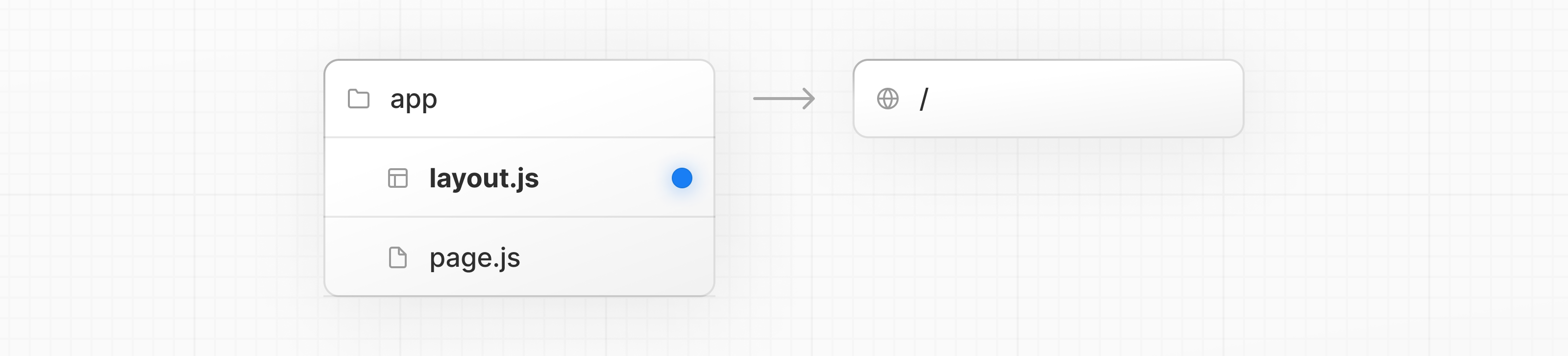
For example, to create a layout that accepts your index page as child, add a layout file inside the app directory:
export default function DashboardLayout({ children }: { children: React.ReactNode }) {
  return (
    <html lang="en">
      <body>
        {/* Layout UI */}
        {/* Place children where you want to render a page or nested layout */}
        <main>{children}</main>
      </body>
    </html>
  );
}
export default function DashboardLayout({ children }) {
  return (
    <html lang="en">
      <body>
        {/* Layout UI */}
        {/* Place children where you want to render a page or nested layout */}
        <main>{children}</main>
      </body>
    </html>
  );
}
The layout above is called a root layout because it's defined at the root of the app directory. The root layout is required and must contain html and body tags.
Creating a nested route
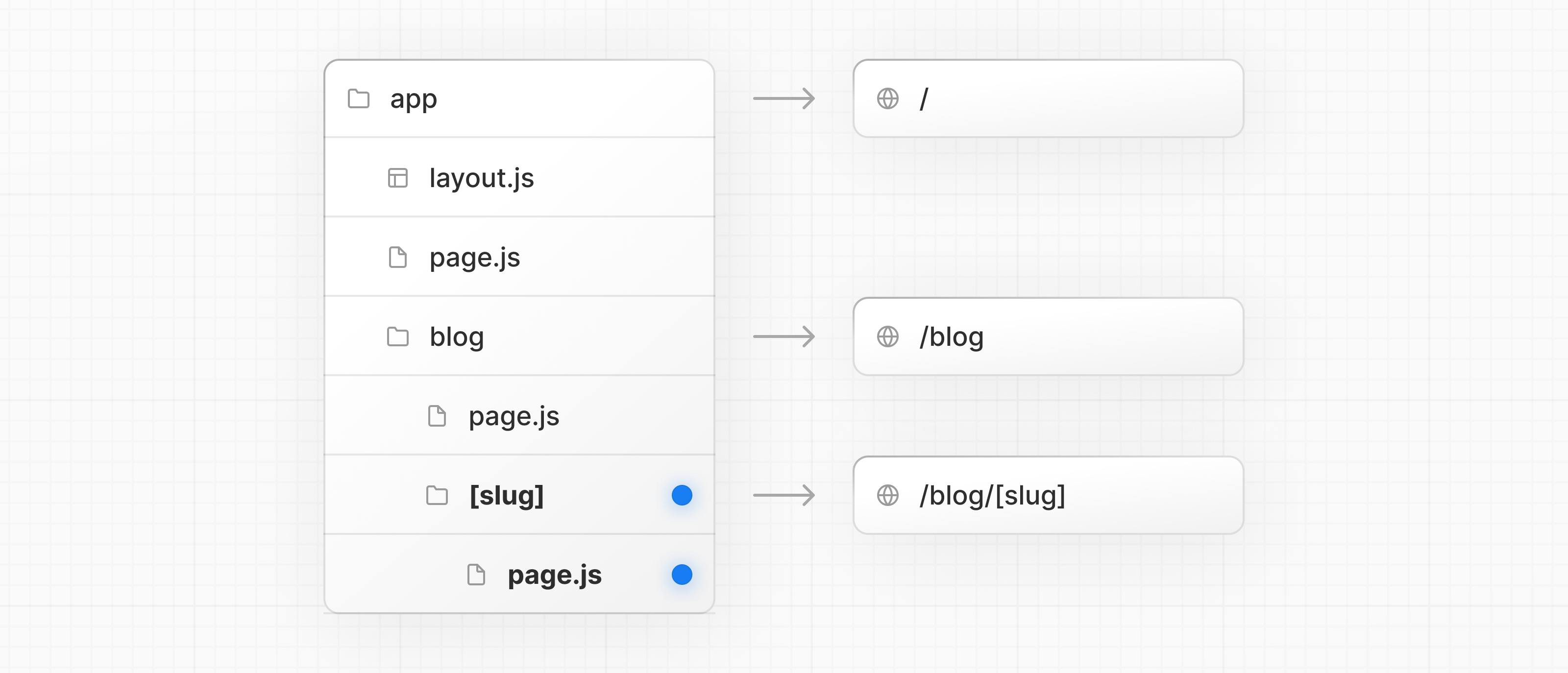
A nested route is a route composed of multiple URL segments. For example, the /blog/[slug] route is composed of three segments:
/(Root Segment)blog(Segment)[slug](Leaf Segment)
In Next.js:
- Folders are used to define the route segments that map to URL segments.
- Files (like
pageandlayout) are used to create UI that is shown for a segment.
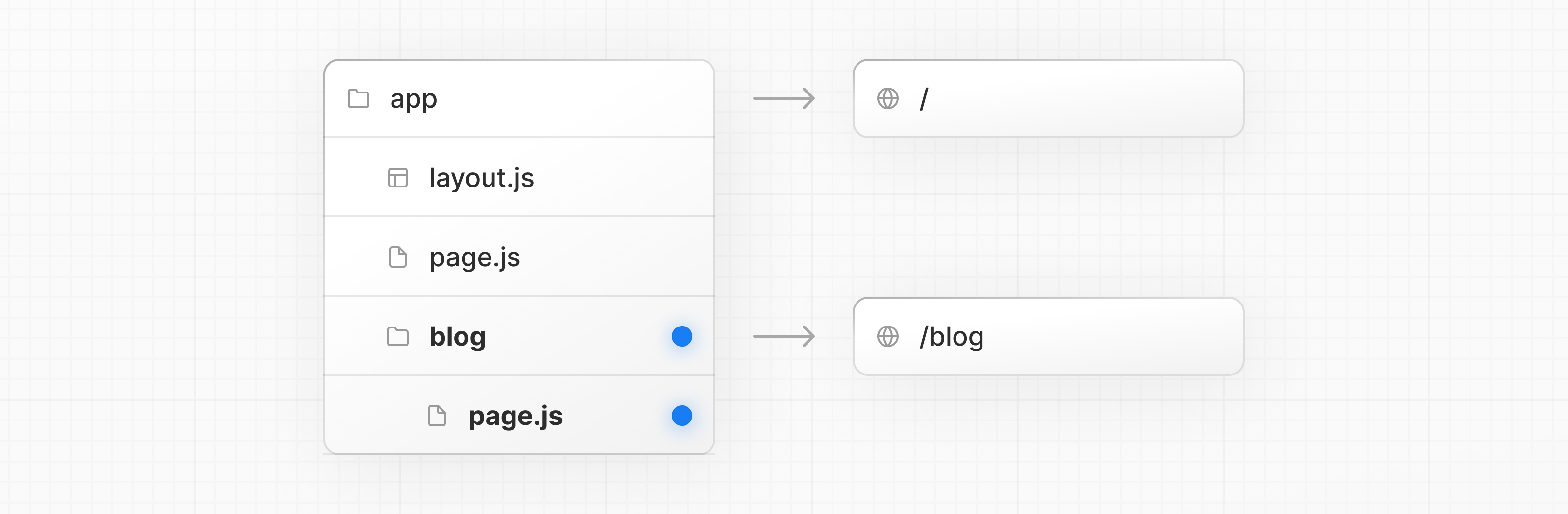
To create nested routes, you can nest folders inside each other. For example, to add a route for /blog, create a folder called blog in the app directory. Then, to make /blog publicly accessible, add a page.tsx file:
// Dummy imports
import { getPosts } from '@/lib/posts';
import { Post } from '@/ui/post';

export default async function Page() {
  const posts = await getPosts();

  return (
    <ul>
      {posts.map((post) => (
        <Post key={post.id} post={post} />
      ))}
    </ul>
  );
}
// Dummy imports
import { getPosts } from '@/lib/posts';
import { Post } from '@/ui/post';

export default async function Page() {
  const posts = await getPosts();

  return (
    <ul>
      {posts.map((post) => (
        <Post key={post.id} post={post} />
      ))}
    </ul>
  );
}
You can continue nesting folders to create nested routes. For example, to create a route for a specific blog post, create a new [slug] folder inside blog and add a page file:
function generateStaticParams() {}

export default function Page() {
  return <h1>Hello, Blog Post Page!</h1>;
}
function generateStaticParams() {}

export default function Page() {
  return <h1>Hello, Blog Post Page!</h1>;
}
Wrapping a folder name in square brackets (e.g. [slug]) creates a dynamic route segment which is used to generate multiple pages from data. e.g. blog posts, product pages, etc.
Nesting layouts
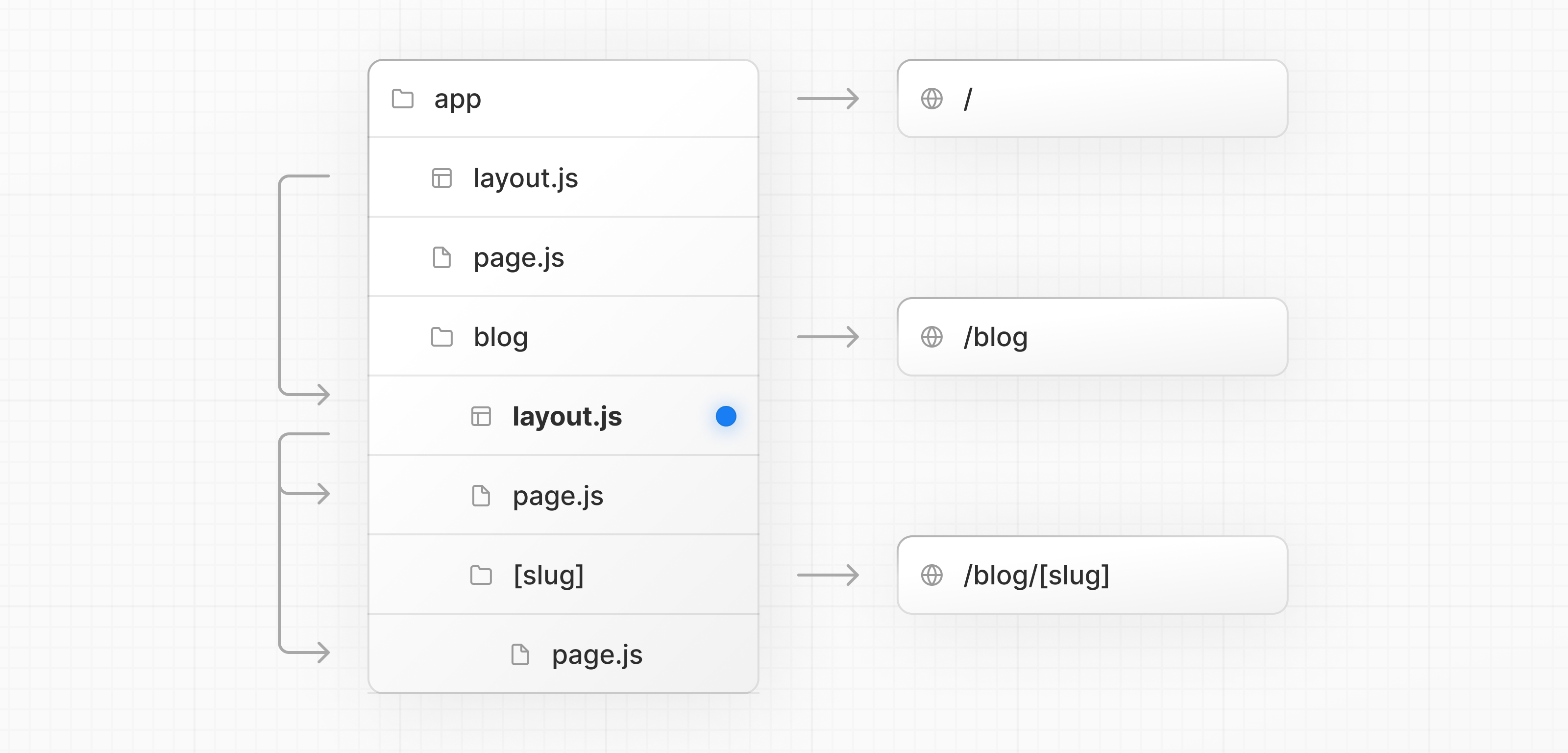
By default, layouts in the folder hierarchy are also nested, which means they wrap child layouts via their children prop. You can nest layouts by adding layout inside specific route segments (folders).
For example, to create a layout for the /blog route, add a new layout file inside the blog folder.
export default function BlogLayout({ children }: { children: React.ReactNode }) {
  return <section>{children}</section>;
}
export default function BlogLayout({ children }) {
  return <section>{children}</section>;
}
If you were to combine the two layouts above, the root layout (app/layout.js) would wrap the blog layout (app/blog/layout.js), which would wrap the blog (app/blog/page.js) and blog post page (app/blog/[slug]/page.js).
Creating a dynamic segment
Dynamic segments allow you to create routes that are generated from data. For example, instead of manually creating a route for each individual blog post, you can create a dynamic segment to generate the routes based on blog post data.
To create a dynamic segment, wrap the segment (folder) name in square brackets: [segmentName]. For example, in the app/blog/[slug]/page.tsx route, the [slug] is the dynamic segment.
export default async function BlogPostPage({ params }: { params: Promise<{ slug: string }> }) {
  const { slug } = await params;
  const post = await getPost(slug);

  return (
    <div>
      <h1>{post.title}</h1>
      <p>{post.content}</p>
    </div>
  );
}
export default async function BlogPostPage({ params }) {
  const { slug } = await params;
  const post = await getPost(slug);

  return (
    <div>
      <h1>{post.title}</h1>
      <p>{post.content}</p>
    </div>
  );
}
Learn more about Dynamic Segments and the params props.
Nested layouts within Dynamic Segments, can also access the params props.
Rendering with search params
In a Server Component page, you can access search parameters using the searchParams prop:
export default async function Page({
  searchParams,
}: {
  searchParams: Promise<{ [key: string]: string | string[] | undefined }>;
}) {
  const filters = (await searchParams).filters;
}
export default async function Page({ searchParams }) {
  const filters = (await searchParams).filters;
}
Using searchParams opts your page into dynamic rendering because it requires an incoming request to read the search parameters from.
Client Components can read search params using the useSearchParams hook.
Learn more about useSearchParams in statically rendered and dynamically rendered routes.
What to use and when
- Use the
searchParamsprop when you need search parameters to load data for the page (e.g. pagination, filtering from a database). - Use
useSearchParamswhen search parameters are used only on the client (e.g. filtering a list already loaded via props). - As a small optimization, you can use
new URLSearchParams(window.location.search)in callbacks or event handlers to read search params without triggering re-renders.
Linking between pages
You can use the <Link> component to navigate between routes. <Link> is a built-in Next.js component that extends the HTML <a> tag to provide prefetching and client-side navigation.
For example, to generate a list of blog posts, import <Link> from next/link and pass a href prop to the component:
import Link from 'next/link';

export default async function Post({ post }) {
  const posts = await getPosts();

  return (
    <ul>
      {posts.map((post) => (
        <li key={post.slug}>
          <Link href={`/blog/${post.slug}`}>{post.title}</Link>
        </li>
      ))}
    </ul>
  );
}
import Link from 'next/link';

export default async function Post({ post }) {
  const posts = await getPosts();

  return (
    <ul>
      {posts.map((post) => (
        <li key={post.slug}>
          <Link href={`/blog/${post.slug}`}>{post.title}</Link>
        </li>
      ))}
    </ul>
  );
}
Good to know:
<Link>is the primary way to navigate between routes in Next.js. You can also use theuseRouterhook for more advanced navigation.
Route Props Helpers
Next.js exposes utility types that infer params and named slots from your route structure:
- PageProps: Props for
pagecomponents, includingparamsandsearchParams. - LayoutProps: Props for
layoutcomponents, includingchildrenand any named slots (e.g. folders like@analytics).
These are globally available helpers, generated when running either next dev, next build or next typegen.
export default async function Page(props: PageProps<'/blog/[slug]'>) {
  const { slug } = await props.params;
  return <h1>Blog post: {slug}</h1>;
}
export default function Layout(props: LayoutProps<'/dashboard'>) {
  return (
    <section>
      {props.children}
      {/* If you have app/dashboard/@analytics, it appears as a typed slot: */}
      {/* {props.analytics} */}
    </section>
  );
}
Good to know
- Static routes resolve
paramsto{}.PageProps,LayoutPropsare global helpers — no imports required.- Types are generated during
next dev,next buildornext typegen.
아래 파일 트리에서 page.tsx 파일을 켜고 꺼보세요. 파일이 활성화되면 해당 URL이 공개되고, 비활성화하면 404가 됩니다. 이것이 Next.js의 파일 기반 라우팅에서 page 파일이 라우트를 '공개'하는 핵심 메커니즘입니다.
- page 파일은 특정 라우트의 UI를 렌더링하는 파일
- app/page.tsx → / (인덱스 페이지)
- React 컴포넌트를 default export 해야 함
- page 파일이 없는 폴더는 URL로 접근 불가 (404)
왜 필요한가: page 파일이 없으면 사용자가 해당 URL에 접근했을 때 아무것도 렌더링되지 않고 404가 반환됩니다. page 파일이 라우트를 '존재하게' 만드는 유일한 방법입니다.
언제 사용하는가: 새 페이지를 추가할 때마다 해당 경로에 page.tsx를 생성합니다. 인덱스 페이지(/)는 app/page.tsx, /about 페이지는 app/about/page.tsx에 만듭니다.
파일 트리 — page.tsx 토글
활성 라우트
app/page.tsx참고: 비활성화된 경로(/about, /blog)는 page.tsx 파일이 없으므로 404를 반환합니다. 폴더만으로는 라우트가 공개되지 않습니다.
페이지를 전환해도 nav의 클릭 카운터가 유지됩니다. Layout을 끄면 어떻게 달라지는지 확인하세요.
- layout은 여러 페이지 간 공유되는 UI (네비게이션 바, 사이드바 등)
- 네비게이션 시 layout은 상태를 유지하고 리렌더링하지 않음
- children prop으로 페이지 또는 중첩 layout을 수신
- root layout은 필수이며 html, body 태그를 포함해야 함
왜 필요한가: layout이 없으면 모든 페이지에 동일한 네비게이션, 푸터 등을 복사·붙여넣기해야 합니다. 또한 페이지 전환 시마다 공유 UI의 상태(입력값, 스크롤 등)가 초기화됩니다.
언제 사용하는가: 사이트 전체 또는 특정 섹션에서 공유 UI(헤더, 사이드바, 푸터)가 필요할 때 layout.tsx를 만듭니다. 첫 번째로 만드는 layout은 반드시 root layout(app/layout.tsx)입니다.
Hello Next.js!
Layout ON: 페이지를 전환해도 nav 클릭 카운터가 유지됩니다. Layout 컴포넌트는 리렌더링되지 않고, children 영역만 새 페이지로 교체됩니다.
app/layout.tsx (root layout)
export default function DashboardLayout({
  children,
}: {
  children: React.ReactNode
}) {
  return (
    <html lang="en">
      <body>
        <main>{children}</main>
      </body>
    </html>
  )
}
필수 규칙: root layout(app/layout.tsx)은 반드시 <html>과 <body> 태그를 포함해야 합니다. 이것은 Next.js가 강제하는 유일한 layout 규칙입니다.
아래에서 폴더 구조를 선택해보세요. 폴더를 중첩할수록 URL 세그먼트가 늘어나는 과정을 확인할 수 있습니다. 폴더 구조가 URL을 결정합니다.
- 중첩 라우트는 여러 URL 세그먼트로 구성 (예: /blog/[slug])
- / (Root Segment) → blog (Segment) → [slug] (Leaf Segment)
- 폴더는 라우트 세그먼트를 정의하고, 파일은 해당 세그먼트의 UI를 생성
- [slug] 처럼 대괄호로 감싸면 동적 세그먼트 — 데이터 기반 다중 페이지 생성
왜 필요한가: 중첩 라우트를 이해하지 못하면 /blog와 /blog/my-post를 별개의 독립 라우트로 만들게 되어, 공유 레이아웃과 데이터 상속의 이점을 활용할 수 없습니다.
언제 사용하는가: 블로그 포스트(/blog/[slug]), 상품 페이지(/products/[id]) 등 계층적 URL 구조가 필요할 때 폴더를 중첩합니다.
폴더 구조 선택
폴더 구조
app/
├── blog/
    ├── [slug]/
        └── page.tsx
    └── page.tsx
└── page.tsx
생성되는 URL
app/blog/[slug]/page.tsx로 /blog/:slug 동적 경로 생성
세그먼트 분해
app/blog/[slug]/page.tsx
function generateStaticParams() {}

export default function Page() {
  return <h1>Hello, Blog Post Page!</h1>
}[slug]는 동적 라우트 세그먼트로, 블로그 포스트·상품 페이지 등 데이터로부터 여러 페이지를 생성할 때 사용합니다.
전체 파일 구조 예시
app/
├── page.tsx          → /
└── blog/
    ├── page.tsx      → /blog
    └── [slug]/
└── page.tsx → /blog/:slug라우트를 전환하면 유지되는 layout(초록)과 교체되는 부분(노랑)을 관찰하세요.
- layout은 폴더 계층에 따라 자동 중첩
- root layout (app/layout.tsx) → blog layout (app/blog/layout.tsx) → page
- 각 layout은 children prop으로 자식 layout 또는 page를 수신
- 중간 layout을 추가하면 해당 세그먼트와 모든 하위 세그먼트에 적용
왜 필요한가: layout 중첩이 없으면 /blog와 /blog/[slug]에 동일한 사이드바나 네비게이션을 각각 따로 구현해야 합니다. 중첩 layout으로 DRY 원칙을 유지하면서 섹션별 공유 UI를 적용할 수 있습니다.
언제 사용하는가: /blog 아래 모든 페이지에 공통 사이드바를 추가하고 싶을 때, /dashboard 섹션에 전용 네비게이션을 넣고 싶을 때 등 특정 라우트 그룹에만 공유 UI가 필요할 때 중첩 layout을 사용합니다.
Welcome Home!
현재 래핑 체인 (/):
app/blog/layout.tsx
export default function BlogLayout({
  children,
}: {
  children: React.ReactNode
}) {
  return <section>{children}</section>
}아래 예시 slug를 클릭해보세요. 하나의 [slug]/page.tsx가 어떻게 서로 다른 URL과 콘텐츠를 생성하는지 확인할 수 있습니다. 이것이 동적 세그먼트의 핵심입니다.
- [segmentName] — 대괄호로 감싼 폴더가 동적 세그먼트
- params는 Promise<{ slug: string }> 타입 — 반드시 await 필요 (Next.js 15+)
- 하나의 page.tsx로 /blog/hello-world, /blog/nextjs-routing 등 다수 페이지 생성
- 중첩된 layout도 동일한 params에 접근 가능
왜 필요한가: 동적 세그먼트가 없으면 블로그 포스트마다 별도 page.tsx 파일을 수동으로 만들어야 합니다. 100개의 포스트가 있으면 100개의 파일이 필요하게 되어 유지보수가 불가능합니다.
언제 사용하는가: 블로그(/blog/[slug]), 상품(/products/[id]), 사용자 프로필(/users/[username]) 등 동일한 UI 구조를 데이터에 따라 다른 콘텐츠로 렌더링할 때 사용합니다.
slug 선택
Hello World
첫 번째 블로그 포스트입니다.
params 객체
Promise// await params 결과:
{
slug: "hello-world"
}URL: /blog/hello-world
렌더링 결과
Hello World
첫 번째 블로그 포스트입니다.
매칭됨app/blog/[slug]/page.tsx
export default async function BlogPostPage({
  params,
}: {
  params: Promise<{ slug: string }>
}) {
  const { slug } = await params
  const post = await getPost(slug)

  return (
    <div>
      <h1>{post.title}</h1>
      <p>{post.content}</p>
    </div>
  )
}
참고: 중첩된 layout에서도 동일한 params에 접근할 수 있습니다. Next.js 15+에서 params는 Promise 타입이므로 반드시 await해야 합니다.
프리셋을 선택하면 URL의 쿼리스트링이 searchParams 객체로 어떻게 변환되는지 확인하세요.
- searchParams는 Server Component page의 prop으로 쿼리 파라미터를 수신
- Promise<{ [key: string]: string | string[] | undefined }> 타입
- searchParams를 사용하면 자동으로 dynamic rendering이 활성화됨
- Client Component에서는 useSearchParams() hook 사용
왜 필요한가: searchParams를 사용하지 않으면 URL 쿼리(?page=2&sort=date)를 읽을 수 없어 필터링, 페이지네이션, 검색 기능을 서버에서 처리할 수 없습니다.
언제 사용하는가: 페이지네이션, 필터링, 검색 등 URL 쿼리를 기반으로 서버에서 데이터를 로드해야 할 때 searchParams prop을 사용합니다.
/page?sort=asc
쿼리 부분에 마우스를 올리면 대응하는 searchParams 키가 하이라이트됩니다.
쿼리 파라미터
await searchParams
Dynamic{
}
searchParams를 사용하면 요청마다 서버에서 렌더링됩니다 (dynamic rendering).
app/page.tsx
export default async function Page({
  searchParams,
}: {
  searchParams: Promise<{ [key: string]: string | string[] | undefined }>
}) {
  const filters = (await searchParams).filters
}
참고: searchParams prop은 Server Component에서만 사용 가능합니다. Client Component에서는 useSearchParams() hook을, 이벤트 핸들러에서는 new URLSearchParams()를 사용하세요.
Rendering with search params
아래 세 가지 방법 중 하나를 선택해보세요. 각 방법의 코드, 실행 환경, 리렌더링 동작이 즉시 바뀝니다. search params를 읽는 세 가지 방법이 각각 어떤 상황에 최적인지 비교할 수 있습니다.
- searchParams prop — 서버에서 데이터 로드 시 사용 (페이지네이션, DB 필터링)
- useSearchParams() — 클라이언트에서 이미 로드된 데이터 필터링 시 사용
- new URLSearchParams() — 이벤트 핸들러에서 리렌더링 없이 값 읽기 (최적화)
왜 필요한가: 잘못된 방법을 선택하면 불필요한 서버 요청, 불필요한 리렌더링, 또는 서버/클라이언트 불일치 에러가 발생합니다.
언제 사용하는가: URL에 ?key=value 형태로 상태를 저장해야 할 때 (공유 가능한 URL, 뒤로가기 지원). 어떤 방법을 쓸지는 '데이터가 서버에서 필요한가, 클라이언트에서 필요한가'로 결정합니다.
export default async function Page({
  searchParams,
}: {
  searchParams: Promise<{ [key: string]: string | string[] | undefined }>
}) {
  const filters = (await searchParams).filters
  // DB에서 필터링된 데이터 로드
}
사용 시점
페이지 데이터 로드에 쿼리 파라미터가 필요할 때 (페이지네이션, DB 필터링)
리렌더링 동작
요청마다 서버에서 렌더링 (dynamic rendering)
서버 데이터 로드
✓ 가능 (async/await로 DB 쿼리)
| 방법 | 환경 | 리렌더링 | 데이터 로드 |
|---|---|---|---|
searchParams prop | Server Component | 서버 | ✓ |
useSearchParams() | Client Component | 클라이언트 | ✕ |
new URLSearchParams() | Event Handler | 없음 | ✕ |
Link와 <a> 태그 모드를 전환한 뒤 블로그 포스트 링크에 마우스를 올리고 클릭해보세요. Link 모드에서는 hover 시 prefetch가 시작되고 클릭 시 client-side 전환이 일어나지만, <a> 모드에서는 매번 전체 페이지가 다시 로드됩니다.
- <Link>는 HTML <a>를 확장 — prefetching + client-side navigation 제공
- import Link from "next/link" 으로 가져옴
- href prop으로 이동할 경로 지정
- useRouter hook으로 프로그래매틱 네비게이션도 가능
왜 필요한가: <a> 태그만 사용하면 매 클릭마다 전체 페이지가 다시 로드되어 SPA의 빠른 전환 경험을 잃습니다. <Link>는 필요한 데이터만 fetch하여 즉시 전환합니다.
언제 사용하는가: 페이지 간 내비게이션이 필요한 모든 곳에서 <Link>를 사용합니다. 프로그래매틱 네비게이션(예: 폼 제출 후 리디렉트)에는 useRouter를 사용합니다.
Blog
아래 링크를 클릭하면 네비게이션됩니다
블로그 포스트 목록
네비게이션 로그
링크를 클릭하면 이벤트가 표시됩니다
app/ui/post.tsx
import Link from 'next/link'

export default async function Post({ post }) {
  const posts = await getPosts()

  return (
    <ul>
      {posts.map((post) => (
        <li key={post.slug}>
          <Link href={`/blog/${post.slug}`}>{post.title}</Link>
        </li>
      ))}
    </ul>
  )
}
참고: <Link>는 Next.js에서 라우트 간 이동의 기본 방법입니다. 더 고급 네비게이션(폼 제출 후 리디렉트 등)에는 useRouter hook을 사용할 수 있습니다. prefetching은 production 빌드에서 완전히 동작합니다.
아래 라우트 경로를 선택해보세요. 각 경로에 대해 PageProps 또는 LayoutProps가 어떤 타입을 추론하는지 실시간으로 확인할 수 있습니다. 이 헬퍼들은 import 없이 사용할 수 있는 글로벌 타입입니다.
- PageProps<Route> — params + searchParams 자동 추론
- LayoutProps<Route> — children + named slots(@folder) 자동 추론
- 글로벌 헬퍼 — import 불필요, next dev/build/typegen 시 자동 생성
- 정적 라우트의 params는 빈 객체({})로 추론됨
왜 필요한가: 수동으로 params 타입을 정의하면 라우트 구조 변경 시 타입과 실제 값이 불일치할 수 있습니다. PageProps/LayoutProps는 라우트 구조에서 자동 추론하므로 항상 정확합니다.
언제 사용하는가: page.tsx에서 params나 searchParams의 타입을 지정할 때, layout.tsx에서 children이나 named slot의 타입을 지정할 때 사용합니다. 특히 동적 세그먼트가 많은 라우트에서 유용합니다.
추론된 타입
PageProps<'/blog/[slug]'>
// 추론 결과:
{
  params: Promise<{ slug: string }>
  searchParams: Promise<{
    [key: string]: string | string[] | undefined
  }>
}
사용 예시
export default async function Page(
  props: PageProps<'/blog/[slug]'>
) {
  const { slug } = await props.params
  return <h1>Blog post: {slug}</h1>
}
참고: PageProps와 LayoutProps는 글로벌 헬퍼로 import가 필요 없습니다. next dev, next build, next typegen 실행 시 자동 생성됩니다.
Next.js uses file-system based routing, meaning you can use folders and files to define routes. This page will guide you through how to create layouts and pages, and link between them.
Creating a page
A page is UI that is rendered on a specific route. To create a page, add a page file inside the app directory and default export a React component. For example, to create an index page (/):
export default function Page() {
  return <h1>Hello Next.js!</h1>;
}
export default function Page() {
  return <h1>Hello Next.js!</h1>;
}
Creating a layout
A layout is UI that is shared between multiple pages. On navigation, layouts preserve state, remain interactive, and do not rerender.
You can define a layout by default exporting a React component from a layout file. The component should accept a children prop which can be a page or another layout.
For example, to create a layout that accepts your index page as child, add a layout file inside the app directory:
export default function DashboardLayout({ children }: { children: React.ReactNode }) {
  return (
    <html lang="en">
      <body>
        {/* Layout UI */}
        {/* Place children where you want to render a page or nested layout */}
        <main>{children}</main>
      </body>
    </html>
  );
}
export default function DashboardLayout({ children }) {
  return (
    <html lang="en">
      <body>
        {/* Layout UI */}
        {/* Place children where you want to render a page or nested layout */}
        <main>{children}</main>
      </body>
    </html>
  );
}
The layout above is called a root layout because it's defined at the root of the app directory. The root layout is required and must contain html and body tags.
Creating a nested route
A nested route is a route composed of multiple URL segments. For example, the /blog/[slug] route is composed of three segments:
/(Root Segment)blog(Segment)[slug](Leaf Segment)
In Next.js:
- Folders are used to define the route segments that map to URL segments.
- Files (like
pageandlayout) are used to create UI that is shown for a segment.
To create nested routes, you can nest folders inside each other. For example, to add a route for /blog, create a folder called blog in the app directory. Then, to make /blog publicly accessible, add a page.tsx file:
// Dummy imports
import { getPosts } from '@/lib/posts';
import { Post } from '@/ui/post';

export default async function Page() {
  const posts = await getPosts();

  return (
    <ul>
      {posts.map((post) => (
        <Post key={post.id} post={post} />
      ))}
    </ul>
  );
}
// Dummy imports
import { getPosts } from '@/lib/posts';
import { Post } from '@/ui/post';

export default async function Page() {
  const posts = await getPosts();

  return (
    <ul>
      {posts.map((post) => (
        <Post key={post.id} post={post} />
      ))}
    </ul>
  );
}
You can continue nesting folders to create nested routes. For example, to create a route for a specific blog post, create a new [slug] folder inside blog and add a page file:
function generateStaticParams() {}

export default function Page() {
  return <h1>Hello, Blog Post Page!</h1>;
}
function generateStaticParams() {}

export default function Page() {
  return <h1>Hello, Blog Post Page!</h1>;
}
Wrapping a folder name in square brackets (e.g. [slug]) creates a dynamic route segment which is used to generate multiple pages from data. e.g. blog posts, product pages, etc.
Nesting layouts
By default, layouts in the folder hierarchy are also nested, which means they wrap child layouts via their children prop. You can nest layouts by adding layout inside specific route segments (folders).
For example, to create a layout for the /blog route, add a new layout file inside the blog folder.
export default function BlogLayout({ children }: { children: React.ReactNode }) {
  return <section>{children}</section>;
}
export default function BlogLayout({ children }) {
  return <section>{children}</section>;
}
If you were to combine the two layouts above, the root layout (app/layout.js) would wrap the blog layout (app/blog/layout.js), which would wrap the blog (app/blog/page.js) and blog post page (app/blog/[slug]/page.js).
Creating a dynamic segment
Dynamic segments allow you to create routes that are generated from data. For example, instead of manually creating a route for each individual blog post, you can create a dynamic segment to generate the routes based on blog post data.
To create a dynamic segment, wrap the segment (folder) name in square brackets: [segmentName]. For example, in the app/blog/[slug]/page.tsx route, the [slug] is the dynamic segment.
export default async function BlogPostPage({ params }: { params: Promise<{ slug: string }> }) {
  const { slug } = await params;
  const post = await getPost(slug);

  return (
    <div>
      <h1>{post.title}</h1>
      <p>{post.content}</p>
    </div>
  );
}
export default async function BlogPostPage({ params }) {
  const { slug } = await params;
  const post = await getPost(slug);

  return (
    <div>
      <h1>{post.title}</h1>
      <p>{post.content}</p>
    </div>
  );
}
Learn more about Dynamic Segments and the params props.
Nested layouts within Dynamic Segments, can also access the params props.
Rendering with search params
In a Server Component page, you can access search parameters using the searchParams prop:
export default async function Page({
  searchParams,
}: {
  searchParams: Promise<{ [key: string]: string | string[] | undefined }>;
}) {
  const filters = (await searchParams).filters;
}
export default async function Page({ searchParams }) {
  const filters = (await searchParams).filters;
}
Using searchParams opts your page into dynamic rendering because it requires an incoming request to read the search parameters from.
Client Components can read search params using the useSearchParams hook.
Learn more about useSearchParams in statically rendered and dynamically rendered routes.
What to use and when
- Use the
searchParamsprop when you need search parameters to load data for the page (e.g. pagination, filtering from a database). - Use
useSearchParamswhen search parameters are used only on the client (e.g. filtering a list already loaded via props). - As a small optimization, you can use
new URLSearchParams(window.location.search)in callbacks or event handlers to read search params without triggering re-renders.
Linking between pages
You can use the <Link> component to navigate between routes. <Link> is a built-in Next.js component that extends the HTML <a> tag to provide prefetching and client-side navigation.
For example, to generate a list of blog posts, import <Link> from next/link and pass a href prop to the component:
import Link from 'next/link';

export default async function Post({ post }) {
  const posts = await getPosts();

  return (
    <ul>
      {posts.map((post) => (
        <li key={post.slug}>
          <Link href={`/blog/${post.slug}`}>{post.title}</Link>
        </li>
      ))}
    </ul>
  );
}
import Link from 'next/link';

export default async function Post({ post }) {
  const posts = await getPosts();

  return (
    <ul>
      {posts.map((post) => (
        <li key={post.slug}>
          <Link href={`/blog/${post.slug}`}>{post.title}</Link>
        </li>
      ))}
    </ul>
  );
}
Good to know:
<Link>is the primary way to navigate between routes in Next.js. You can also use theuseRouterhook for more advanced navigation.
Route Props Helpers
Next.js exposes utility types that infer params and named slots from your route structure:
- PageProps: Props for
pagecomponents, includingparamsandsearchParams. - LayoutProps: Props for
layoutcomponents, includingchildrenand any named slots (e.g. folders like@analytics).
These are globally available helpers, generated when running either next dev, next build or next typegen.
export default async function Page(props: PageProps<'/blog/[slug]'>) {
  const { slug } = await props.params;
  return <h1>Blog post: {slug}</h1>;
}
export default function Layout(props: LayoutProps<'/dashboard'>) {
  return (
    <section>
      {props.children}
      {/* If you have app/dashboard/@analytics, it appears as a typed slot: */}
      {/* {props.analytics} */}
    </section>
  );
}
Good to know
- Static routes resolve
paramsto{}.PageProps,LayoutPropsare global helpers — no imports required.- Types are generated during
next dev,next buildornext typegen.
아래 파일 트리에서 page.tsx 파일을 켜고 꺼보세요. 파일이 활성화되면 해당 URL이 공개되고, 비활성화하면 404가 됩니다. 이것이 Next.js의 파일 기반 라우팅에서 page 파일이 라우트를 '공개'하는 핵심 메커니즘입니다.
- page 파일은 특정 라우트의 UI를 렌더링하는 파일
- app/page.tsx → / (인덱스 페이지)
- React 컴포넌트를 default export 해야 함
- page 파일이 없는 폴더는 URL로 접근 불가 (404)
왜 필요한가: page 파일이 없으면 사용자가 해당 URL에 접근했을 때 아무것도 렌더링되지 않고 404가 반환됩니다. page 파일이 라우트를 '존재하게' 만드는 유일한 방법입니다.
언제 사용하는가: 새 페이지를 추가할 때마다 해당 경로에 page.tsx를 생성합니다. 인덱스 페이지(/)는 app/page.tsx, /about 페이지는 app/about/page.tsx에 만듭니다.
파일 트리 — page.tsx 토글
활성 라우트
app/page.tsx참고: 비활성화된 경로(/about, /blog)는 page.tsx 파일이 없으므로 404를 반환합니다. 폴더만으로는 라우트가 공개되지 않습니다.
페이지를 전환해도 nav의 클릭 카운터가 유지됩니다. Layout을 끄면 어떻게 달라지는지 확인하세요.
- layout은 여러 페이지 간 공유되는 UI (네비게이션 바, 사이드바 등)
- 네비게이션 시 layout은 상태를 유지하고 리렌더링하지 않음
- children prop으로 페이지 또는 중첩 layout을 수신
- root layout은 필수이며 html, body 태그를 포함해야 함
왜 필요한가: layout이 없으면 모든 페이지에 동일한 네비게이션, 푸터 등을 복사·붙여넣기해야 합니다. 또한 페이지 전환 시마다 공유 UI의 상태(입력값, 스크롤 등)가 초기화됩니다.
언제 사용하는가: 사이트 전체 또는 특정 섹션에서 공유 UI(헤더, 사이드바, 푸터)가 필요할 때 layout.tsx를 만듭니다. 첫 번째로 만드는 layout은 반드시 root layout(app/layout.tsx)입니다.
Hello Next.js!
Layout ON: 페이지를 전환해도 nav 클릭 카운터가 유지됩니다. Layout 컴포넌트는 리렌더링되지 않고, children 영역만 새 페이지로 교체됩니다.
app/layout.tsx (root layout)
export default function DashboardLayout({
  children,
}: {
  children: React.ReactNode
}) {
  return (
    <html lang="en">
      <body>
        <main>{children}</main>
      </body>
    </html>
  )
}
필수 규칙: root layout(app/layout.tsx)은 반드시 <html>과 <body> 태그를 포함해야 합니다. 이것은 Next.js가 강제하는 유일한 layout 규칙입니다.
아래에서 폴더 구조를 선택해보세요. 폴더를 중첩할수록 URL 세그먼트가 늘어나는 과정을 확인할 수 있습니다. 폴더 구조가 URL을 결정합니다.
- 중첩 라우트는 여러 URL 세그먼트로 구성 (예: /blog/[slug])
- / (Root Segment) → blog (Segment) → [slug] (Leaf Segment)
- 폴더는 라우트 세그먼트를 정의하고, 파일은 해당 세그먼트의 UI를 생성
- [slug] 처럼 대괄호로 감싸면 동적 세그먼트 — 데이터 기반 다중 페이지 생성
왜 필요한가: 중첩 라우트를 이해하지 못하면 /blog와 /blog/my-post를 별개의 독립 라우트로 만들게 되어, 공유 레이아웃과 데이터 상속의 이점을 활용할 수 없습니다.
언제 사용하는가: 블로그 포스트(/blog/[slug]), 상품 페이지(/products/[id]) 등 계층적 URL 구조가 필요할 때 폴더를 중첩합니다.
폴더 구조 선택
폴더 구조
app/
├── blog/
    ├── [slug]/
        └── page.tsx
    └── page.tsx
└── page.tsx
생성되는 URL
app/blog/[slug]/page.tsx로 /blog/:slug 동적 경로 생성
세그먼트 분해
app/blog/[slug]/page.tsx
function generateStaticParams() {}

export default function Page() {
  return <h1>Hello, Blog Post Page!</h1>
}[slug]는 동적 라우트 세그먼트로, 블로그 포스트·상품 페이지 등 데이터로부터 여러 페이지를 생성할 때 사용합니다.
전체 파일 구조 예시
app/
├── page.tsx          → /
└── blog/
    ├── page.tsx      → /blog
    └── [slug]/
└── page.tsx → /blog/:slug라우트를 전환하면 유지되는 layout(초록)과 교체되는 부분(노랑)을 관찰하세요.
- layout은 폴더 계층에 따라 자동 중첩
- root layout (app/layout.tsx) → blog layout (app/blog/layout.tsx) → page
- 각 layout은 children prop으로 자식 layout 또는 page를 수신
- 중간 layout을 추가하면 해당 세그먼트와 모든 하위 세그먼트에 적용
왜 필요한가: layout 중첩이 없으면 /blog와 /blog/[slug]에 동일한 사이드바나 네비게이션을 각각 따로 구현해야 합니다. 중첩 layout으로 DRY 원칙을 유지하면서 섹션별 공유 UI를 적용할 수 있습니다.
언제 사용하는가: /blog 아래 모든 페이지에 공통 사이드바를 추가하고 싶을 때, /dashboard 섹션에 전용 네비게이션을 넣고 싶을 때 등 특정 라우트 그룹에만 공유 UI가 필요할 때 중첩 layout을 사용합니다.
Welcome Home!
현재 래핑 체인 (/):
app/blog/layout.tsx
export default function BlogLayout({
  children,
}: {
  children: React.ReactNode
}) {
  return <section>{children}</section>
}아래 예시 slug를 클릭해보세요. 하나의 [slug]/page.tsx가 어떻게 서로 다른 URL과 콘텐츠를 생성하는지 확인할 수 있습니다. 이것이 동적 세그먼트의 핵심입니다.
- [segmentName] — 대괄호로 감싼 폴더가 동적 세그먼트
- params는 Promise<{ slug: string }> 타입 — 반드시 await 필요 (Next.js 15+)
- 하나의 page.tsx로 /blog/hello-world, /blog/nextjs-routing 등 다수 페이지 생성
- 중첩된 layout도 동일한 params에 접근 가능
왜 필요한가: 동적 세그먼트가 없으면 블로그 포스트마다 별도 page.tsx 파일을 수동으로 만들어야 합니다. 100개의 포스트가 있으면 100개의 파일이 필요하게 되어 유지보수가 불가능합니다.
언제 사용하는가: 블로그(/blog/[slug]), 상품(/products/[id]), 사용자 프로필(/users/[username]) 등 동일한 UI 구조를 데이터에 따라 다른 콘텐츠로 렌더링할 때 사용합니다.
slug 선택
Hello World
첫 번째 블로그 포스트입니다.
params 객체
Promise// await params 결과:
{
slug: "hello-world"
}URL: /blog/hello-world
렌더링 결과
Hello World
첫 번째 블로그 포스트입니다.
매칭됨app/blog/[slug]/page.tsx
export default async function BlogPostPage({
  params,
}: {
  params: Promise<{ slug: string }>
}) {
  const { slug } = await params
  const post = await getPost(slug)

  return (
    <div>
      <h1>{post.title}</h1>
      <p>{post.content}</p>
    </div>
  )
}
참고: 중첩된 layout에서도 동일한 params에 접근할 수 있습니다. Next.js 15+에서 params는 Promise 타입이므로 반드시 await해야 합니다.
프리셋을 선택하면 URL의 쿼리스트링이 searchParams 객체로 어떻게 변환되는지 확인하세요.
- searchParams는 Server Component page의 prop으로 쿼리 파라미터를 수신
- Promise<{ [key: string]: string | string[] | undefined }> 타입
- searchParams를 사용하면 자동으로 dynamic rendering이 활성화됨
- Client Component에서는 useSearchParams() hook 사용
왜 필요한가: searchParams를 사용하지 않으면 URL 쿼리(?page=2&sort=date)를 읽을 수 없어 필터링, 페이지네이션, 검색 기능을 서버에서 처리할 수 없습니다.
언제 사용하는가: 페이지네이션, 필터링, 검색 등 URL 쿼리를 기반으로 서버에서 데이터를 로드해야 할 때 searchParams prop을 사용합니다.
/page?sort=asc
쿼리 부분에 마우스를 올리면 대응하는 searchParams 키가 하이라이트됩니다.
쿼리 파라미터
await searchParams
Dynamic{
}
searchParams를 사용하면 요청마다 서버에서 렌더링됩니다 (dynamic rendering).
app/page.tsx
export default async function Page({
  searchParams,
}: {
  searchParams: Promise<{ [key: string]: string | string[] | undefined }>
}) {
  const filters = (await searchParams).filters
}
참고: searchParams prop은 Server Component에서만 사용 가능합니다. Client Component에서는 useSearchParams() hook을, 이벤트 핸들러에서는 new URLSearchParams()를 사용하세요.
Rendering with search params
아래 세 가지 방법 중 하나를 선택해보세요. 각 방법의 코드, 실행 환경, 리렌더링 동작이 즉시 바뀝니다. search params를 읽는 세 가지 방법이 각각 어떤 상황에 최적인지 비교할 수 있습니다.
- searchParams prop — 서버에서 데이터 로드 시 사용 (페이지네이션, DB 필터링)
- useSearchParams() — 클라이언트에서 이미 로드된 데이터 필터링 시 사용
- new URLSearchParams() — 이벤트 핸들러에서 리렌더링 없이 값 읽기 (최적화)
왜 필요한가: 잘못된 방법을 선택하면 불필요한 서버 요청, 불필요한 리렌더링, 또는 서버/클라이언트 불일치 에러가 발생합니다.
언제 사용하는가: URL에 ?key=value 형태로 상태를 저장해야 할 때 (공유 가능한 URL, 뒤로가기 지원). 어떤 방법을 쓸지는 '데이터가 서버에서 필요한가, 클라이언트에서 필요한가'로 결정합니다.
export default async function Page({
  searchParams,
}: {
  searchParams: Promise<{ [key: string]: string | string[] | undefined }>
}) {
  const filters = (await searchParams).filters
  // DB에서 필터링된 데이터 로드
}
사용 시점
페이지 데이터 로드에 쿼리 파라미터가 필요할 때 (페이지네이션, DB 필터링)
리렌더링 동작
요청마다 서버에서 렌더링 (dynamic rendering)
서버 데이터 로드
✓ 가능 (async/await로 DB 쿼리)
| 방법 | 환경 | 리렌더링 | 데이터 로드 |
|---|---|---|---|
searchParams prop | Server Component | 서버 | ✓ |
useSearchParams() | Client Component | 클라이언트 | ✕ |
new URLSearchParams() | Event Handler | 없음 | ✕ |
Link와 <a> 태그 모드를 전환한 뒤 블로그 포스트 링크에 마우스를 올리고 클릭해보세요. Link 모드에서는 hover 시 prefetch가 시작되고 클릭 시 client-side 전환이 일어나지만, <a> 모드에서는 매번 전체 페이지가 다시 로드됩니다.
- <Link>는 HTML <a>를 확장 — prefetching + client-side navigation 제공
- import Link from "next/link" 으로 가져옴
- href prop으로 이동할 경로 지정
- useRouter hook으로 프로그래매틱 네비게이션도 가능
왜 필요한가: <a> 태그만 사용하면 매 클릭마다 전체 페이지가 다시 로드되어 SPA의 빠른 전환 경험을 잃습니다. <Link>는 필요한 데이터만 fetch하여 즉시 전환합니다.
언제 사용하는가: 페이지 간 내비게이션이 필요한 모든 곳에서 <Link>를 사용합니다. 프로그래매틱 네비게이션(예: 폼 제출 후 리디렉트)에는 useRouter를 사용합니다.
Blog
아래 링크를 클릭하면 네비게이션됩니다
블로그 포스트 목록
네비게이션 로그
링크를 클릭하면 이벤트가 표시됩니다
app/ui/post.tsx
import Link from 'next/link'

export default async function Post({ post }) {
  const posts = await getPosts()

  return (
    <ul>
      {posts.map((post) => (
        <li key={post.slug}>
          <Link href={`/blog/${post.slug}`}>{post.title}</Link>
        </li>
      ))}
    </ul>
  )
}
참고: <Link>는 Next.js에서 라우트 간 이동의 기본 방법입니다. 더 고급 네비게이션(폼 제출 후 리디렉트 등)에는 useRouter hook을 사용할 수 있습니다. prefetching은 production 빌드에서 완전히 동작합니다.
아래 라우트 경로를 선택해보세요. 각 경로에 대해 PageProps 또는 LayoutProps가 어떤 타입을 추론하는지 실시간으로 확인할 수 있습니다. 이 헬퍼들은 import 없이 사용할 수 있는 글로벌 타입입니다.
- PageProps<Route> — params + searchParams 자동 추론
- LayoutProps<Route> — children + named slots(@folder) 자동 추론
- 글로벌 헬퍼 — import 불필요, next dev/build/typegen 시 자동 생성
- 정적 라우트의 params는 빈 객체({})로 추론됨
왜 필요한가: 수동으로 params 타입을 정의하면 라우트 구조 변경 시 타입과 실제 값이 불일치할 수 있습니다. PageProps/LayoutProps는 라우트 구조에서 자동 추론하므로 항상 정확합니다.
언제 사용하는가: page.tsx에서 params나 searchParams의 타입을 지정할 때, layout.tsx에서 children이나 named slot의 타입을 지정할 때 사용합니다. 특히 동적 세그먼트가 많은 라우트에서 유용합니다.
추론된 타입
PageProps<'/blog/[slug]'>
// 추론 결과:
{
  params: Promise<{ slug: string }>
  searchParams: Promise<{
    [key: string]: string | string[] | undefined
  }>
}
사용 예시
export default async function Page(
  props: PageProps<'/blog/[slug]'>
) {
  const { slug } = await props.params
  return <h1>Blog post: {slug}</h1>
}
참고: PageProps와 LayoutProps는 글로벌 헬퍼로 import가 필요 없습니다. next dev, next build, next typegen 실행 시 자동 생성됩니다.